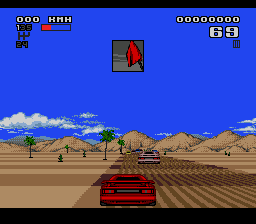
Lotus II (USA) (Beta)
Lotus II (USA) (Beta) on Genesis
Lotus II (USA) (Beta) is a pre-release build of the sequel to the original Lotus racing game for the SEGA Genesis. This version offers a glimpse into the development process before the final commercial launch. The game falls squarely in the Racing genre and represents an early snapshot of a title that would become a solid arcade-style racer on the console. While the exact developer of this specific beta isn't widely documented, the full retail version was handled by Gremlin Graphics and published by Gremlin for various platforms.
Players pick from a selection of cars and race through a series of tracks, aiming to finish first or at least qualify for the next event. The core loop involves accelerating, steering, and shifting gears while avoiding competitors and obstacles. Lotus II introduces more diverse environments and vehicle choices compared to its predecessor, keeping the straightforward yet engaging formula of point-to-point racing. The beta likely contains some of these elements, though not all content may be final.
Today, this beta is worth checking out if you are curious about development history or simply enjoy classic Genesis racing games. It offers a raw, unpolished take on a well-known arcade racer. Compared to other racers of the era like OutRun or Super Hang-On, Lotus II carves its own niche with a focus on track variety and responsive handling. The beta nature means you might encounter quirks or missing features, but that adds to the historical appeal for retro enthusiasts.
How to Play Lotus II (USA) (Beta) Online
Getting Started
When you first boot the Lotus II beta, you will likely see a title screen and then a menu where you can choose between starting a race, selecting options, or possibly viewing controls. Use the D-pad to navigate and the Start button (Enter) to confirm. The game may present a car selection screen; pick one based on handling and speed preferences. After that, a track selection screen appears where you choose your circuit.
The core gameplay involves racing against AI opponents across a series of stages. You accelerate with the B button (S on keyboard) and steer with the D-pad. The A button (X) is used for shifting gears or other actions depending on the version. Pay attention to your speed and the track layout; corners require braking or downshifting. The goal is to finish as high as possible to advance to the next race. In the beta, some features might be incomplete, but the basic racing loop should work.
If you encounter menu text in English, navigation is straightforward. Otherwise, trial and error may be needed. This beta is a historical artifact, so expect minor glitches or placeholder content. Enjoy the raw driving experience from an era when arcade racers were all about speed and reflexes.
Lotus II (USA) (Beta) Keyboard Controls
Controls
- Arrow Keys: D-Pad / Movement
- X: A button
- S: B button
- Z: C button
- A: X button (6-button pad)
- Q: Y button (6-button pad)
- E: Z button (6-button pad)
- Enter: Start / Mode




Comments (0)