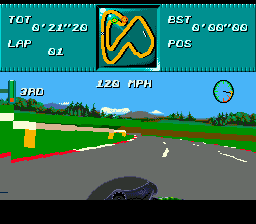
Kawasaki Superbike Challenge (USA) (Beta)
Kawasaki Superbike Challenge (USA) (Beta) on Genesis
Kawasaki Superbike Challenge is a motorcycle racing game that originally came out in 1994 for the SEGA Genesis and other platforms. This particular version is labeled as a USA beta build, meaning it's a pre-release copy that may differ from the final retail release. It was published under the Kawasaki license and puts you in the seat of a factory team rider, though the specific developer isn't widely documented in common retro databases. For Genesis owners, it's one of those obscure racing titles that didn't get as much attention as the big-name franchises like Road Rash or Super Hang-On, but the beta status makes it a point of curiosity for collectors and fans of unfinished or early builds.
How to Play Kawasaki Superbike Challenge (USA) (Beta) Online
To start playing Kawasaki Superbike Challenge, first boot the ROM and you'll likely see a title screen followed by a menu. Press Enter to start. You'll probably select options like single race or championship mode. This is a typical racing game where you choose your rider and bike before each race. The core loop is simple: race against AI opponents on a set track, try to finish first. Pay attention to corners - you need to brake or downshift to avoid sliding off the road.
The game uses a behind-bike perspective and you control acceleration, braking, and steering. The D-Pad tilts your rider left and right. X is likely confirm, S might be cancel or brake. Because this is a beta, some menus or text may appear incomplete or placeholder - that's part of the charm. If you're used to later racing games, remember this is early 90s tech so the physics are simpler and the graphics are sprite-based. Just pick a track, shift into gear, and go for the checkered flag.
Kawasaki Superbike Challenge (USA) (Beta) Keyboard Controls
Controls
- Arrow Keys: D-Pad / Movement
- X: A button
- S: B button
- Z: C button
- A: X button (6-button pad)
- Q: Y button (6-button pad)
- E: Z button (6-button pad)
- Enter: Start / Mode




Comments (0)