Greatest Heavyweights (Japan)
Inside Greatest Heavyweights (Japan)
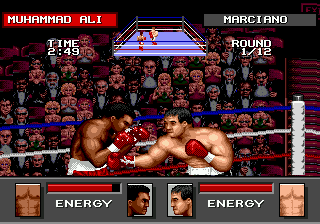
Greatest Heavyweights (Japan) is a boxing simulation released for the Sega Genesis in the early 1990s. It is a direct sequel to Evander Holyfield's Real Deal Boxing, building on that game's foundation. This version was released exclusively in Japan, though the gameplay is largely the same as the North American release. As a first-party title, it was developed and published by Sega, showcasing the company's push into sports gaming during the 16-bit era.
How to Play Greatest Heavyweights (Japan) Online
Getting Started
When you start Greatest Heavyweights, you are greeted with a menu in Japanese. The main options are likely similar to the English version: Exhibition, Career, and Options. If you cannot read Japanese, refer to the button layout: Start (Enter) confirms, B cancels. Try pressing A or B on the topmost option to enter Exhibition mode.
Once in a fight, the core loop is a boxing match. You control a heavyweight boxer against an AI opponent (or a second player). Use the D-Pad to move around the ring, duck, and weave. The A button throws a jab, the B button throws a powerful punch, and the C button (not mapped to keyboard) is not available here; instead, use Y (Z key) for uppercuts or special moves if the game supports them. Block by holding the D-Pad away from the opponent. Watch your stamina - throwing punches drains it, and you need to rest or block to recover.
If a match reaches the final bell, the winner is determined by points. Knocking your opponent down repeatedly leads to a knockout. The career mode lets you fight through a series of opponents, but menus are in Japanese - trial and error will reveal the flow. Overall, the game plays similarly to its predecessor, focusing on realistic timing and punishment over arcade combos.
Greatest Heavyweights (Japan) Keyboard Controls
Controls
- Arrow Keys: D-Pad / Movement
- X: A button
- S: B button
- Z: C button
- A: X button (6-button pad)
- Q: Y button (6-button pad)
- E: Z button (6-button pad)
- Enter: Start / Mode






Comments (0)