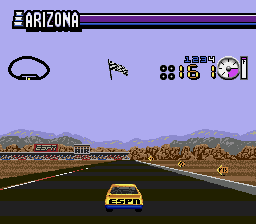
ESPN Speed World (USA) (Beta)
ESPN Speed World (USA) (Beta) - Racing Classic
How to Play ESPN Speed World (USA) (Beta) Online
Getting Started
When you boot up this beta, you will likely be presented with a menu to select a car or track. Use the D-Pad to navigate and press Enter (Start) to confirm your choice. The game is a straightforward stock car racer, so your goal is to complete laps on oval tracks and beat the AI opponents.
During the race, control your car with the D-Pad. The A and B buttons might handle acceleration and braking, though in many Genesis racing games A is gas and B is brake. Experiment to find the correct mapping. The beta may have limited or no sound, and some graphical elements could be incomplete. Expect occasional bugs or missing features that were likely removed from the final version that never shipped.
There is no save functionality in this beta build; each session is a fresh start. The core loop is simple: pick a track, race against other cars, and try to finish first. If you are a fan of early NASCAR games, this build offers a glimpse into what might have been a more polished title.
ESPN Speed World (USA) (Beta) Keyboard Controls
Controls
- Arrow Keys: D-Pad / Movement
- X: A button
- S: B button
- Z: C button
- A: X button (6-button pad)
- Q: Y button (6-button pad)
- E: Z button (6-button pad)
- Enter: Start / Mode


Comments (0)