🔊 Tap Play, then press “Play Now”
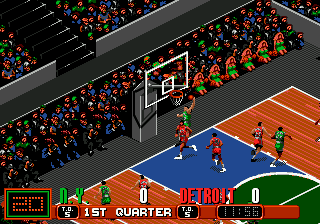
David Robinson Basketball (Japan)
David Robinson Basketball (Japan) on Genesis
David Robinson Basketball (Japan) is the localized version of Sega's 1992 basketball sim for the Genesis. It was published by Sega and features the retired San Antonio Spurs center David Robinson on the cover. While the gameplay remains identical to the North American release, the Japanese edition swaps text and menus to Japanese, making it a unique curiosity for collectors of import Genesis sports titles.
The game offers exhibition and tournament modes where you pick an NBA-style team (with lightly fictionalized rosters) and go head-to-head against the CPU or a second player. On the court you control one player at a time, dribbling, passing, and shooting with the B and A buttons, while the CPU controls your other four teammates. There is no season mode or deep management layer - it's arcade-style basketball focused on fast five-on-five matches that keep the pace quick and the scoring high.
As an import title, David Robinson Basketball (Japan) mostly appeals to retro collectors who want a complete Genesis library or enjoy seeing how regional versions differ. The Japanese script doesn't change the core experience, so English-speaking players can still pick it up easily once they memorize a few menu positions. Compared to later Genesis basketball games like NBA Jam or Lakers vs. Celtics, this one is more simulation-leaning but still very playable today, especially for fans of early 90s sports titles.
The game offers exhibition and tournament modes where you pick an NBA-style team (with lightly fictionalized rosters) and go head-to-head against the CPU or a second player. On the court you control one player at a time, dribbling, passing, and shooting with the B and A buttons, while the CPU controls your other four teammates. There is no season mode or deep management layer - it's arcade-style basketball focused on fast five-on-five matches that keep the pace quick and the scoring high.
As an import title, David Robinson Basketball (Japan) mostly appeals to retro collectors who want a complete Genesis library or enjoy seeing how regional versions differ. The Japanese script doesn't change the core experience, so English-speaking players can still pick it up easily once they memorize a few menu positions. Compared to later Genesis basketball games like NBA Jam or Lakers vs. Celtics, this one is more simulation-leaning but still very playable today, especially for fans of early 90s sports titles.
How to Play David Robinson Basketball (Japan) Online
Getting Started: After the title screen, press Start to reach the main menu. Menus are entirely in Japanese, but the layout mirrors the North American version: the top option is Exhibition (a single match), the second is Tournament (a playoff bracket), and the third is a password entry screen for continuing a tournament. Use the D-Pad to move up and down, then press X (A button) to confirm. If you get lost, try selecting the first option - it's always the quickest way to play.
Before a game you can choose from several teams and adjust quarter length. Once the tip-off begins, the core loop is standard five-on-five basketball. Use the D-Pad to move, S (B button) to run or steal/cancel, X (A button) to jump for rebounds or blocks, and A (X button) to shoot. Pass by pressing Z (Y button). The game doesn't have complex special moves, so just focus on getting open, passing to a teammate, and taking smart shots. The CPU is challenging at default difficulty, so work on your timing for jump shots and layups.
David Robinson Basketball (Japan) Keyboard Controls
Controls
- Arrow Keys: D-Pad / Movement
- X: A button
- S: B button
- Z: C button
- A: X button (6-button pad)
- Q: Y button (6-button pad)
- E: Z button (6-button pad)
- Enter: Start / Mode
Frequently Asked Questions
Roughly how long does it take to finish David Robinson Basketball?
A single game clocked at the default quarter length runs about 20-30 minutes. Completing the Tournament mode by winning all playoff games can take roughly 2-3 hours depending on your skill and the quarter settings. There is no story or campaign beyond the tournament bracket.
Which regions was David Robinson Basketball released in?
The game was released commercially in North America, Europe, and Japan. The Japanese version features full Japanese text for menus and team names, while the Western releases are in English. All versions share the same gameplay and visual assets.
Can players save progress in David Robinson Basketball?
No, the cartridge does not have battery-backed save memory. The Tournament mode uses a password system that lets you continue from your last completed round. Write down the password shown at the end of each game to resume later.






Comments (0)