The game loads when you press Play · press “Play Now” inside the game if it asks.
David Crane's Amazing Tennis (USA)
David Crane's Amazing Tennis
David Crane's Amazing Tennis Overview
- SEGA Genesis
- Sports
- 5· 0 votes
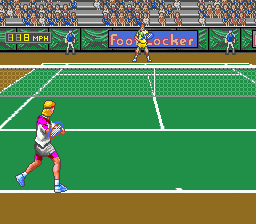
David Crane's Amazing Tennis hit the SEGA Genesis in 1991, a time when sports simulations were starting to push beyond simple 2D sprites. This is a tennis game, pure and simple, but it carries the name of a legendary designer known for classic Atari 2600 titles. It was published by Absolute Entertainment and developed by David Crane himself, aiming to bring a more realistic tennis experience to the 16-bit era. If you are a fan of retro sports games, this one has a special place in the Genesis library for its early attempt at depth perception on a console known for fast action.
The core gameplay revolves around positioning your player on the court and timing your swing. What sets this title apart is its use of layered foreground and background elements to simulate a three-dimensional playing field, which was fairly novel at the time. You control your tennis pro from an overhead-ish perspective, moving to intercept the ball and choosing between different shot types. The pace is deliberate, requiring you to read the ball's trajectory and anticipate where it will land. Matches play out in standard sets and games, with AI opponents that offer a decent challenge.
Today, David Crane's Amazing Tennis is worth a look if you are curious about the evolution of sports games on the Genesis. It is not the flashiest or fastest tennis sim out there, but its early adoption of pseudo-3D visuals makes it a neat piece of history. Compared to later titles like Super Tennis or Wimbledon, it feels a bit more methodical and experimental. If you enjoy seeing how developers tackled polygonal-like graphics with sprite tricks, this one is a solid example. Just don't expect arcade thrills - it is a simulation at heart, albeit a primitive one by modern standards.
GAME INFO
- Platform
- SEGA Genesis
- Genre
- Sports
- Developer
- Absolute Entertainment
- Released
- 1991
- Players
- 1-2
- Region
- USA
How to play David Crane's Amazing Tennis online
Before you start, you will see a title screen. Press Enter to bring up the main menu. Use the D-Pad to highlight options like single match or tournament, then press X to confirm. You can choose between playing against the computer or a second player. Once you pick your character and court, the match begins.
Your goal is to win points by hitting the ball past your opponent. Move your player with the D-Pad, positioning them where the ball will land. Press X to swing. Timing matters - swing early for a harder shot, late for a lob. The game uses a foreground and background system to give a sense of depth, so watch how the ball shrinks as it moves away. Try to anticipate the ball's path rather than chasing it after it bounces. The AI is fairly consistent, so mix up your shots to keep it guessing.
If you are new to tennis games, start with a simple single match on easy difficulty to get a feel for the movement and swing timing. The controls are responsive but require some practice to master. There is no tutorial, so jump in and experiment. Remember that holding a direction while swinging can influence shot placement. The game does not have complex power meters or stamina mechanics, so focus on positioning and timing.
CONTROLS
Controls
- Arrow Keys: D-Pad / Movement
- X: A button
- S: B button
- Z: C button
- A: X button (6-button pad)
- Q: Y button (6-button pad)
- E: Z button (6-button pad)
- Enter: Start / Mode
David Crane's Amazing Tennis FAQ
Is David Crane's Amazing Tennis exclusive to SEGA Genesis or did it appear on other systems?
It was released exclusively for the SEGA Genesis in North America. No ports to other platforms have been documented.
Does David Crane's Amazing Tennis have a multiplayer or co-op mode?
Yes, it includes a two-player versus mode where both players compete head-to-head on the same screen. There is no cooperative play.
What makes David Crane's Amazing Tennis stand out among SEGA Genesis titles of its era?
Its use of layered foreground and background elements to simulate a z-axis was pioneering for sports games on the Genesis, offering a sense of depth that most 2D tennis games lacked at the time.
You may also like
All SEGA Genesis games











GAME INFO
- Platform
- SEGA Genesis
- Genre
- Sports
- Developer
- Absolute Entertainment
- Released
- 1991
- Players
- 1-2
- Region
- USA
COMMENTS (0)
No comments yet. Be the first to share your thoughts.