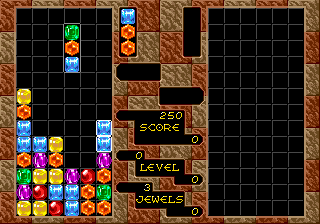
Columns (World) (v1.1)
Columns (World) (v1.1) Overview
Columns is a puzzle game that first hit the SEGA Genesis in 1990, developed and published by Sega. This World version likely represents a revision (v1.1) that may include minor updates or bug fixes. It's a classic example of the falling-block puzzle genre that dominated arcades and home consoles in the late 80s and early 90s.
The objective is straightforward: a column of three different colored jewels descends from the top of the playfield. You can move the column left or right with the D-pad and cycle the order of the jewels by pressing a button. The goal is to line up three or more matching jewels in a row, column, or diagonal. When you do, those jewels vanish and any above them fall, potentially creating chain reactions. The speed increases as you progress, adding pressure.
What makes Columns worth revisiting is its simple yet addictive gameplay. It's a solid alternative to Tetris, with its own strategic twist thanks to the reordering mechanic. While it may not have the depth of some later puzzlers, it remains a clean, well-executed example of the genre that holds up well for quick sessions.
How to Play Columns (World) (v1.1) Online
In Columns, you control a column of three different colored jewels that falls from the top of the playfield. Use the D-pad to move the column left or right, and press the A or B button to cycle the order of the three jewels. Your goal is to arrange them so that when they land, you create a horizontal, vertical, or diagonal line of three or more matching jewels. Those jewels disappear, and any jewels above them drop down, potentially setting off chain reactions.
The game starts at a slow pace but gradually speeds up, demanding quicker decisions. There is no way to rotate the column as a whole; instead you reorder the three jewels within it. Watch the upcoming jewel colors to plan ahead. If the jewels stack to the top of the playfield, the game ends. Aim for a high score by clearing as many lines as possible.
Columns (World) (v1.1) Keyboard Controls
Controls
- Arrow Keys: D-Pad / Movement
- X: A button
- S: B button
- Z: C button
- A: X button (6-button pad)
- Q: Y button (6-button pad)
- E: Z button (6-button pad)
- Enter: Start / Mode






Comments (0)