CHOOSE A VERSION
3 versions · same consoleChoose an original release, regional version, revision, bootleg or clearly labelled ROM hack/mod, then press Play. Hacks may change the gameplay. Switching versions restarts the player.
- Default · Europe · April 1996
- Brian Lara Cricket 96 (Europe) (March 1996)
- Shane Warne Cricket (Europe)
Selected: Default · Europe · April 1996 · Europe
The game loads when you press Play · press “Play Now” inside the game if it asks.
Brian Lara Cricket 96 (Europe) (April 1996)
Brian Lara Cricket 96
What is Brian Lara Cricket 96?
- SEGA Genesis
- Sports
- 5· 0 votes
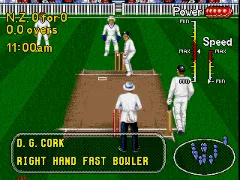
In play, you control your team through batting, bowling, and fielding. Batting involves timing your swing as the bowler delivers, with placement options if you move the batter before the ball arrives. Bowling lets you choose from different deliveries - fast, spin, or slower balls - and adjust line and length before release. The core loop is simple: bat for overs, bowl the opponent out, and chase or defend a target. There's no career mode or tournament structure beyond a basic series setup, so you're mostly playing exhibition matches or a short cup.
Today, Brian Lara Cricket 96 is a curiosity for retro cricket fans rather than a must-play classic. It feels lightweight compared to later cricket games like the EA Sports series, but it has a certain charm with its digitized batting animations and the presence of real players like Lara and Warne (under license). If you grew up with Megadrive sports games or just want a quick cricket fix without modern complexity, it's worth a look. For anyone else, it's a decent period piece that shows how far cricket games have come.
GAME INFO
- Platform
- SEGA Genesis
- Genre
- Sports
- Released
- 1996
- Players
- 1-2
- Region
- Europe
- Version
- April 1996
More Brian Lara Cricket Games
Ready for another round? Explore more Brian Lara Cricket games and console editions. Choose a game below to play it on its own page.
How to play Brian Lara Cricket 96 online
Getting Started
When you boot Brian Lara Cricket 96, the first screen is usually a title sequence followed by a menu where you pick teams and match type. Use the D-Pad to navigate and the A button (X on keyboard) to select. You can choose from international sides like England, Australia, West Indies, and others, each with their real player names. The match options are typically One Day (limited overs) or Test (unlimited overs, which takes much longer). Select your team and opponent, then start the match.
The core game proceeds in innings. When batting, watch the bowler's run-up and time your swing by pressing the B button (S key) as the ball reaches you. You can move your batsman left or right before the delivery to adjust placement. When bowling, you control the pace and direction: press B to start the run-up, then press it again at the right moment for the delivery. Use the D-Pad to set line (left/right) and length (up/down). The game gives you a power meter for bowling but it's forgiving once you get the rhythm.
Fielding is mostly automatic - your fielders move on their own, but you can control which fielder runs to a ball by moving the D-Pad toward it. If a catch opportunity appears, you need to position under the ball and press B to catch. The game has no tutorial, so expect to lose your first few matches while you learn bat timing and bowling speed. The April 1996 build is a later revision that fixed some bugs from the first release, so it's the most stable version to play.
CONTROLS
Controls
- Arrow Keys: D-Pad / Movement
- X: A button
- S: B button
- Z: C button
- A: X button (6-button pad)
- Q: Y button (6-button pad)
- E: Z button (6-button pad)
- Enter: Start / Mode
Brian Lara Cricket 96 FAQ
What makes Brian Lara Cricket 96 stand out among SEGA Genesis titles of its era?
It's one of only two cricket games released on the Genesis in Europe, and it featured real player names and likenesses under license. The digitized batting animation and the inclusion of Brian Lara (a genuine cricket star at the time) gave it an authenticity that most other sports sims on the system lacked.
Is Brian Lara Cricket 96 considered easy to pick up or challenging?
Batting and bowling are fairly easy to learn because the controls are simple and forgiving. The real challenge comes from reading the bowler's delivery and building a high score under pressure - computer AI can be tough on higher difficulties, but casual players will find it accessible.
Which regions was Brian Lara Cricket 96 released in?
It came out in Europe under the Brian Lara Cricket 96 name, and in Australia and New Zealand it was branded as Shane Warne Cricket. A Japan release did not happen, and there was no separate North American version.
You may also like
All SEGA Genesis games











GAME INFO
- Platform
- SEGA Genesis
- Genre
- Sports
- Released
- 1996
- Players
- 1-2
- Region
- Europe
- Version
- April 1996
COMMENTS (0)
No comments yet. Be the first to share your thoughts.