Air Management - Oozora ni Kakeru (Japan)
Air Management - Oozora ni Kakeru (Japan) - Simulation Classic
Air Management: Oozora ni Kakeru is the Japanese title for what western gamers know as Aerobiz, a business simulation originally released for the SEGA Genesis in 1992. Published and developed by Koei, this game puts you in charge of a global airline company during the dawn of commercial jet travel. It's a management sim through and through, built around careful resource allocation and strategic expansion rather than any action or adventure elements.
Your core objective is to build a profitable airline network across major cities. You start by selecting a home base, then purchase aircraft, open routes, set ticket prices, and negotiate landing rights. The simulation runs over several decades, with each turn representing a season. You must react to fuel price fluctuations, economic booms and recessions, and even political events that affect which routes you can fly. The interface is menu-driven, with maps and spreadsheets showing route profitability and fleet status.
Today, Air Management remains a solid example of the mid-90s PC-style simulation brought to consoles. Its niche appeal means it's not for everyone, but fans of Koei's other historical sims or anyone who enjoys number-crunching and long-term planning will find it rewarding. The Japanese version features menus entirely in Japanese, so non-Japanese readers may want to seek the English Aerobiz ROM instead. Still, the core mechanics are universal, and the satisfaction of building a global airline empire holds up well.
How to Play Air Management - Oozora ni Kakeru (Japan) Online
When you first start Air Management - Oozora ni Kakeru (Japan), you will be greeted with a title screen and a Japanese menu. Press Start to proceed. The main menu offers options like New Game, Load Game, and Options, but all text is in Japanese. If you cannot read it, try selecting the topmost option to begin a new game. At the file select screen, pick an empty slot.
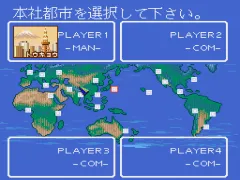
Once in the game, you choose a starting city from a world map. The interface is split into several screens: a world map for route planning, a fleet management screen, and a financial overview. Your goal is to purchase aircraft, open routes between cities, and adjust ticket prices each turn. Keep an eye on your cash flow and fuel costs. The game runs turn-by-turn - you set everything for the season, then press Start to advance time.
Because menus are entirely in Japanese, memorizing the layout helps. The top menu usually includes "Route" (route management), "Aircraft" (buy/sell planes), "Finance" (loans and reports), and "End Turn". If you make a mistake, you can restart from the file select screen. Patience and trial‑and‑error will get you comfortable with the interface quickly.
Air Management - Oozora ni Kakeru (Japan) Keyboard Controls
Controls
- Arrow Keys: D-Pad / Movement
- X: A button
- S: B button
- Z: C button
- A: X button (6-button pad)
- Q: Y button (6-button pad)
- E: Z button (6-button pad)
- Enter: Start / Mode






Comments (0)