Virtua Fighter Mini (Japan)
Virtua Fighter Mini (Japan): GG Fighting
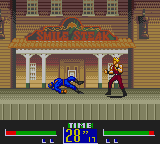
Virtua Fighter Mini is the handheld port of Sega's groundbreaking 3D arcade fighter, brought to the Game Gear exclusively in Japan. Released by Sega in 1995, this version shrinks down the polygon-based visuals of the original into sprite-based characters while keeping the core martial arts gameplay intact. It's a faithful adaptation for Sega's 8-bit handheld, offering a taste of the arcade classic to Japanese gamers on the go.
How to Play Virtua Fighter Mini (Japan) Online
Getting Started:
When you boot up Virtua Fighter Mini, the title screen appears in Japanese. Press Start (Enter) to reach the main menu. From here, use the D-Pad to navigate: the first option is usually "Game Start" or "VS Mode" (if two players with a link cable). Select it and press X (A button) to confirm. You'll then pick a fighter from the roster - each character has unique moves and fighting styles.
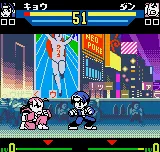
Once a match begins, your goal is to deplete the opponent's health bar or knock them out of the ring. Use the D-Pad to move, crouch, and sidestep. The B button (S) performs a high punch or kick, while holding down and pressing B does a low attack. The Y button (Z) is used for blocking. Try basic combos like punch-punch-kick or experiment with special moves such as throws (press forward + A). The AI is decent, so you'll need to master spacing and timing. Despite being a portable version, the game retains the three-round match structure. If you're playing alone, you'll fight through a series of opponents in a small tournament. Winning the final match clears the game. Since all menus are in Japanese, remember that the second menu option often lets you adjust difficulty or sound settings, but the default is fine for a first play.
Virtua Fighter Mini (Japan) Keyboard Controls
Controls
- Arrow Keys: D-Pad / Movement
- X: Button 1
- S: Button 2
- Enter: Start / Pause
Comments (0)