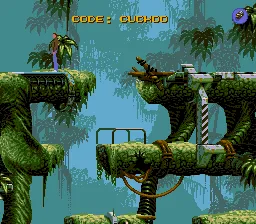
The game loads when you press Play · press “Play Now” inside the game if it asks.
Flashback - The Quest for Identity
Flashback - The Quest for Identity
What is Flashback - The Quest for Identity?
- SEGA CD
- Platformer
- 5· 0 votes
Playing Flashback means guiding protagonist Conrad through a series of connected environments, from alien jungles to futuristic cities. The core loop involves moving across scrolling screens, interacting with objects, and figuring out how to proceed. You can run, jump, climb ledges, and use a blaster to deal with hostile creatures. The game often requires backtracking and paying close attention to the environment to find keys or activate switches.
What makes Flashback worth trying today is its place in the lineage of narrative-driven platformers alongside Another World and Prince of Persia. The rotoscoped animation gives it a fluid, realistic feel that was impressive for the time, and the non-linear level design rewards careful exploration. It remains a solid example of how early 90s developers blended action with adventure elements, though newcomers should expect a slower pace than typical platform games.
GAME INFO
- Platform
- SEGA CD
- Genre
- Platformer
- Players
- 1
How to play Flashback - The Quest for Identity online
Getting Started
When you start a new game, you'll be dropped into a jungle area with no immediate instructions. Walk to the right using the Arrow Keys to explore. You'll soon encounter a small creature and a locked gate. To progress, you need to find a key or a way to disable the lock. The game does not hold your hand, so try interacting with objects by pressing the action button (X) near them. Keep an eye out for ledges you can jump onto by pressing up while in the air.
Your main goal is to survive and find your way to the next area. Use the run button (S) to move faster and jump farther, but be cautious as running into enemies will harm you. If you get stuck, revisit earlier screens because they may contain clues or items you missed. The core loop is about observation, experimentation, and patience. There is no built-in hint system, so rely on trial and error.
If you play the SEGA CD version, note that it includes a few minor enhancements over the original computer release, such as CD-quality music and some added cutscenes. The controls remain responsive once you adjust to the D-pad mapping. Remember to save your progress if the emulator supports save states, as the original game lacked a save feature (or used a password system) depending on the region.
CONTROLS
Controls
- Arrow Keys: D-Pad / Movement
- X: A button
- S: B button
- Z: C button
- A: X button (6-button pad)
- Q: Y button (6-button pad)
- E: Z button (6-button pad)
- Enter: Start / Mode
Flashback - The Quest for Identity FAQ
What makes Flashback - The Quest for Identity stand out among SEGA CD titles of its era?
The use of rotoscoped animation gave Conrad lifelike movement rarely seen in 16-bit games. The game's emphasis on exploration and puzzle solving, rather than pure combat, set it apart from typical platformers on the console. Its cinematic presentation and atmospheric soundtrack further distinguished it.
Does Flashback - The Quest for Identity have a multiplayer or co-op mode?
No, the game is strictly a single-player experience. There is no cooperative or versus mode included. The entire adventure is designed around one character navigating the story alone.
Who developed Flashback - The Quest for Identity?
The game was created by Delphine Software, a French studio known for cinematic platformers like Another World. While the original concept and design were led by Paul Cuisset, the SEGA CD port was handled by the same team under the Delphine banner.
You may also like
All SEGA CD games


GAME INFO
- Platform
- SEGA CD
- Genre
- Platformer
- Players
- 1
COMMENTS (0)
No comments yet. Be the first to share your thoughts.