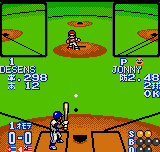
The game loads when you press Play · press “Play Now” inside the game if it asks.
Dynamite Slugger (Japan, Europe) (En,Ja)
Dynamite Slugger
Dynamite Slugger Overview
- NEO-GEO Pocket
- Sports
- 5· 0 votes
Dynamite Slugger brought baseball action to the NEO-GEO Pocket in 1999, near the system's launch window. Developed and published by SNK, this title appeared in both Japan and Europe with English and Japanese language options. It's a straightforward baseball simulation, tapping into the arcade-style sports games SNK was known for on the platform.
You control a team in a standard baseball game, alternating between pitching and batting. Pitching requires selecting pitch type and aiming, while batting involves timing your swing. Fielding is automated to some degree but requires positioning. The game supports single matches or a full season mode, with simple D-pad and button inputs for all actions.
For handheld baseball at the turn of the millennium, Dynamite Slugger delivers a solid arcade experience. Its colorful graphics and quick matches make it ideal for on-the-go play. While not as deep as console baseball sims, it holds up as a fun pick-up-and-play sports title in the NEO-GEO Pocket library.
GAME INFO
- Platform
- NEO-GEO Pocket
- Genre
- Sports
- Publisher
- SNK
- Developer
- SNK
- Released
- 1999
- Players
- 1-2
How to play Dynamite Slugger online
When you start the game, you'll see a title screen with options like Exhibition, Season, and Options. Use the D-pad to highlight your choice and press the A button (X key) to select. In Exhibition mode, you choose a team and opponent for a single nine-inning game. Season mode lets you play through a full schedule. The core loop involves batting and pitching: when batting, watch the pitch and press the A button (X key) to swing, timing matters. As a pitcher, select a pitch type (fastball, curve, etc.) with the D-pad and aim before pressing the A button (X key) to throw. Fielding is mostly automatic but you can move players with the D-pad to catch fly balls. The menus are available in both English and Japanese, so navigation should be straightforward. If you're new, start with Exhibition to get a feel for the pacing and button sensitivity.
CONTROLS
Controls
- Arrow Keys: D-Pad / Movement
- X: A button
- S: B button
- Z: Y button
- A: X button
- Q: L shoulder
- E: R shoulder
- Enter: Start
- V: Select
Dynamite Slugger FAQ
What makes Dynamite Slugger stand out among NEO-GEO Pocket titles of its era?
It offers a faithful baseball simulation with responsive controls and vibrant graphics that show off the handheld's capabilities. The inclusion of a season mode adds replay value beyond quick exhibition matches.
In what year was Dynamite Slugger originally released?
The game originally launched in 1999, shortly after the NEO-GEO Pocket debuted in Japan.
Who developed Dynamite Slugger?
SNK developed the game in-house, as was typical for many of their NEO-GEO Pocket titles.
You may also like
All NEO-GEO Pocket games SNK vs. Capcom - Card Fighters' Clash - SNK Version
 Samurai Shodown! 2 - Pocket Fighting Series
 SNK Gals' Fighters
 SNK vs. Capcom - Card Fighters' Clash - Capcom Version
 King of Fighters R-2 - Pocket Fighting Series
 Rockman - Battle & Fighters
 Fatal Fury F-Contact - Pocket Fighting Series
 King of Fighters R-1 - Pocket Fighting Series
 King of Fighters, The - Battle de Paradise
 Puyo Pop
 Metal Slug - 2nd Mission
 Neo Turf Masters
GAME INFO
- Platform
- NEO-GEO Pocket
- Genre
- Sports
- Publisher
- SNK
- Developer
- SNK
- Released
- 1999
- Players
- 1-2
COMMENTS (0)
No comments yet. Be the first to share your thoughts.