
Vigilante (Japan)
About Vigilante (Japan)
Vigilante arrived on the NEC TurboGrafx-16 in Japan in 1989 as a direct port of Irem's arcade beat-em-up. The PC Engine version brought the side-scrolling brawler action to home consoles, and it remains one of the few fighting games in the system's library. If you've played the arcade original, you'll recognize the same straightforward premise and no-nonsense gameplay.
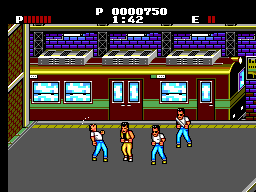
You play as a martial artist on a mission to rescue your kidnapped girlfriend, Madonna. The game scrolls from left to right as you fight waves of thugs using punches, kicks, and occasional weapons like pipes or chains. Each stage ends with a boss fight, and you'll need to balance aggression with caution since your health doesn't refill between sections.
This PC Engine version of Vigilante offers a faithful arcade experience in a single-player package. It's a straightforward brawler with no frills, which makes it easy to pick up. The Japanese text on the menus is not a barrier to playing, and the action is pure retro fun.
How to Play Vigilante (Japan) Online
When you first load Vigilante on the emulator, you'll see a title screen in Japanese. Press the Enter key (Start) to begin. The menu is minimal - just select start to jump into the action. Your goal is to rescue Madonna by fighting through city streets.
The core loop is simple: walk to the right, defeat all enemies that appear, and avoid damage. Use the Arrow Keys to move, the S key (B button) to attack, and the X key (A button) to jump. You can perform jumping attacks by pressing X and S simultaneously. Keep an eye on your health bar at the top of the screen - if it depletes, the game ends.
A few tips: collect weapons dropped by enemies by walking over them. Weapons like nunchaku and pipes give you extra reach. Boss patterns are telegraphed, so learn their attacks. Since the game has no continues, play cautiously. It's a short but challenging brawler that rewards careful play.
Vigilante (Japan) Keyboard Controls
Controls
- Arrow Keys: D-Pad / Movement
- X: I button
- S: II button
- Enter: Run / Start
- V: Select

Comments (0)