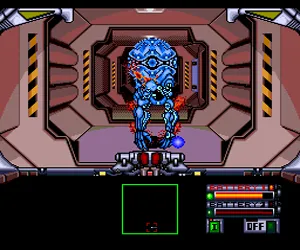
Silent Debuggers (Japan)
Silent Debuggers (Japan) Overview
Silent Debuggers is a first-person shooter released for the NEC PC Engine in Japan back in 1991. Published by Telenet Japan, it arrived on a HuCard and plays natively on the TurboGrafx-16 if you have a region adapter or a modded console. The title may sound like a technical term, but it fits the premise: you are a debugger in a literal sense, clearing out alien infestations aboard a space station.
How to Play Silent Debuggers (Japan) Online
Getting Started
When you boot up Silent Debuggers, you'll see a Japanese title screen. Press Start to proceed; the menu options are in Japanese, but the first item is usually New Game (start a new run). The game drops you into the first-person view of a space station corridor with a crosshair on screen. Move using the D-Pad to navigate the maze-like layout, and press the B button (mapped to S on keyboard) to fire your weapon at any aliens that appear.
The core loop is straightforward: explore each corridor, watch for movement, and shoot the hostile creatures before they damage you. Your health and ammo are displayed on the HUD; keep an eye on them because supplies are limited. The map is not automatically filled out, so you'll need to memorize routes or rely on the directional indicator. Dying sends you back to the beginning, so proceed carefully.
Because the menus are entirely in Japanese, you may want to look up a translation guide online if you intend to change settings or understand story text. The gameplay itself is easy enough to grasp without reading, though: shoot everything that moves, stay aware of your ammunition, and don't corner yourself in the narrow passages.
Silent Debuggers (Japan) Keyboard Controls
Controls
- Arrow Keys: D-Pad / Movement
- X: I button
- S: II button
- Enter: Run / Start
- V: Select


Comments (0)