Dead Moon (Japan)
Getting to Know Dead Moon (Japan)
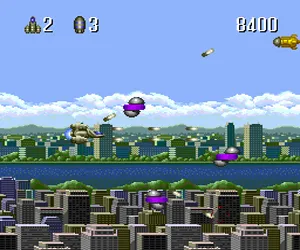
The player controls a lone spacecraft fighting against an alien invasion across six distinct levels. As a traditional side-scroller, you move your ship left and right on the screen and shoot at waves of alien enemies while dodging their gunfire. Power-ups appear throughout the stages, offering improved weapons or shields. Each level ends with a boss encounter that demands pattern recognition and quick reflexes.
For modern players, Dead Moon is a competent but unremarkable entry in the TurboGrafx-16 shooter library. It lacks the flashy innovations of genre highlights like R-Type or Gradius, but its straightforward design and six-level length make it an accessible pick for anyone curious about the console's shoot-'em-up catalog. If you enjoy no-frills space shooting with a retro feel, this import title is worth a try.
How to Play Dead Moon (Japan) Online
When you first load the game, you will see a title screen in Japanese. Press Enter (Start) to proceed. Note that menus are in Japanese, but the flow is simple: after the title, you likely press Start again to begin a new game or select a level. The core loop is straightforward: move your ship with the D-Pad, shoot enemies with the B button, and collect power-ups that appear after destroying certain foes.
Your goal is to survive each of the six levels, defeating the boss at the end of every stage. Enemy bullets are fast, so learn to prioritize dodging over shooting. Power-ups can be gathered by shooting down specific carrier enemies; they usually cycle through options, so tap the fire button briefly to avoid picking up something you don't want. The game continues until you run out of lives, but there is no continue system in the original Japanese release, so practice makes perfect.
Dead Moon (Japan) Keyboard Controls
Controls
- Arrow Keys: D-Pad / Movement
- X: I button
- S: II button
- Enter: Run / Start
- V: Select
Comments (0)