The game loads when you press Play · press “Play Now” inside the game if it asks.
Martial Champion
Martial Champion
Martial Champion Overview
- NEC PC Engine CD
- Fighting
- 5· 0 votes
Martial Champion (マーシャルチャンピオン) is a 1993 fighting game originally released by Konami in arcades before making its way to the NEC PC Engine CD. This home port brought Konami's third-ever fighting game - after Yie Ar Kung-Fu and Galactic Warriors - to a console audience. It arrived hot on the heels of Capcom's Street Fighter II, and you can feel that influence in its one-on-one combat structure, though Konami put its own spin on the formula. The PC Engine CD version kept the arcade's sprite-based visuals and added CD-quality music and voice samples, a treat for the platform.
GAME INFO
- Platform
- NEC PC Engine CD
- Genre
- Fighting
- Publisher
- Konami
- Developer
- Konami
- Released
- 1993
- Players
- 1-2
- Region
- Japan
How to play Martial Champion online
Getting Started
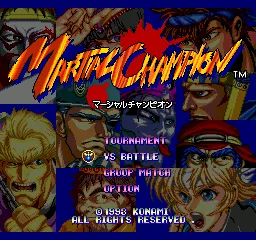
When you boot up Martial Champion on the PC Engine CD, you'll be greeted by a Japanese title screen. Use the D-Pad and confirm with the A button (X key) to navigate the menu. Select either 1 Player mode to fight through a series of opponents or Versus mode to battle a friend. The character select screen shows a roster of fighters, each with distinct looks and move sets - pick one that suits your style.
The core loop is straightforward: you face an opponent in a best-of-three-rounds match. Each round lasts 99 seconds, and the first to win two rounds advances. You move left and right with the D-Pad, jump with the A button, and use the B button for your main attack. Experiment with combinations of directional inputs and attack buttons to discover special moves - Konami included a few signature techniques for each character. Block low or high by holding away from the opponent while crouching or standing.
Because this is a Japanese release, all menus are in Japanese. The main options are usually "1P Game" and "2P Versus", so you can play without reading the language. The difficulty is moderate, with CPU opponents reading your inputs a bit - don't get frustrated; learning patterns is key. If you're new to the genre, start with the character who feels most responsive and practice your timing.
CONTROLS
Controls
- Arrow Keys: D-Pad / Movement
- X: I button
- S: II button
- Enter: Run / Start
- V: Select
Martial Champion FAQ
Who developed Martial Champion?
Konami developed Martial Champion, marking their third fighting game venture after the mid-80s Yie Ar Kung-Fu series. The same team that worked on the arcade original handled the PC Engine CD conversion.
Which regions was Martial Champion released in?
Martial Champion for the PC Engine CD was released exclusively in Japan. The arcade version also saw a limited release in other territories, but the home port never left Japanese shores.
In what year was Martial Champion originally released?
Martial Champion first hit arcades in 1993, with the PC Engine CD port following shortly after that same year.
You may also like
All NEC PC Engine CD games









GAME INFO
- Platform
- NEC PC Engine CD
- Genre
- Fighting
- Publisher
- Konami
- Developer
- Konami
- Released
- 1993
- Players
- 1-2
- Region
- Japan
COMMENTS (0)
No comments yet. Be the first to share your thoughts.