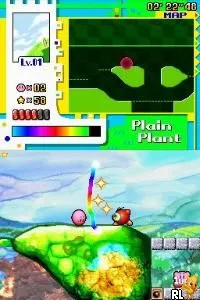
Kirby - Power Paintbrush (Europe) (En,Fr,De,Es,It)
Kirby - Power Paintbrush (Europe) (En,Fr,De,Es,It) - Platformer Classic
Kirby - Power Paintbrush is a platform game released for the Nintendo DS. Originally launched in Europe, it was developed by HAL Laboratory and published by Nintendo. The game utilizes the unique touch screen capabilities of the DS, allowing players to control Kirby in a vibrant, hand-drawn world, making it distinct from traditional Kirby titles.
In Power Paintbrush, players guide Kirby through various levels by utilizing the stylus to draw paths and interact with the environment. The gameplay revolves around painting and erasing to solve puzzles and defeat enemies, providing a fresh take on the platforming genre. Players can collect items and power-ups that enhance Kirby's abilities, adding depth to the otherwise simple controls.
Today, this title is worth exploring for its innovative use of the DS touch screen, which was a defining feature of the platform during its era. While it may not have the same level of recognition as some other Kirby games, its artistic style and unique mechanics offer a charming experience. Fans of platformers and those looking to try something different will find Power Paintbrush a delightful addition to their gaming library.
How to Play Kirby - Power Paintbrush (Europe) (En,Fr,De,Es,It) Online
Getting started in Kirby - Power Paintbrush involves familiarizing yourself with the touch screen mechanics. The game begins with a tutorial that introduces the basic controls, allowing you to draw paths for Kirby to follow. As you progress, the core loop consists of navigating through levels, solving puzzles, and defeating enemies by creatively using your drawing skills.
Pay attention to the environment as there are various obstacles and collectibles to find. Utilizing Kirby's abilities effectively will help you overcome challenges. The game encourages experimentation, so feel free to explore different ways to interact with the world around you.
Kirby - Power Paintbrush (Europe) (En,Fr,De,Es,It) Keyboard Controls
Controls
- Arrow Keys — D-Pad / Movement
- X — A button
- S — B button
- Z — Y button
- A — X button
- Q — L shoulder
- E — R shoulder
- Enter — Start
- V — Select

Comments (0)