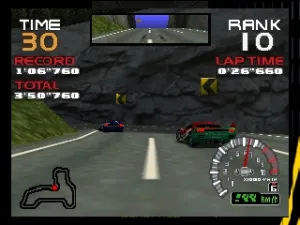
RR64 - Ridge Racer 64 (Europe)
RR64 - Ridge Racer 64 (Europe) Overview
RR64 - Ridge Racer 64 is a racing game developed by Namco and released for the Nintendo 64 in Europe. The game arrived as part of the Ridge Racer series, which is well-known for its arcade-style racing gameplay and drift mechanics. It was originally released in the late 1990s, a time when racing games were evolving rapidly with advancements in 3D graphics and physics on home consoles.
In Ridge Racer 64, players take control of various cars and race on a selection of tracks, each featuring different environments and challenges. The gameplay emphasizes drifting, which is a hallmark of the series, allowing players to navigate tight corners at high speeds. Players can choose from multiple modes, including time trials and races against AI competitors, all while aiming to achieve the best lap times and overall race placements.
Today, RR64 holds nostalgic value for fans of the racing genre and those who appreciate arcade-style gameplay. While it may not have the depth of simulation racers like Gran Turismo, it offers a straightforward and fun racing experience. Its charm lies in the simplicity of its mechanics and the thrill of racing against the clock or AI opponents, making it a worthwhile title for both casual players and retro gaming enthusiasts alike.
How to Play RR64 - Ridge Racer 64 (Europe) Online
To start playing RR64 - Ridge Racer 64, select your preferred mode from the main menu. The game typically offers options like single races and time trials. Once you choose a mode, pick your car and track, then get ready to race.
The core gameplay loop consists of racing against either timed challenges or AI opponents. Focus on mastering the drift mechanic, as it will help you maintain speed while navigating corners. Keep an eye on your position and lap times, and try to improve with each race. The more you practice, the better you'll get at handling the cars and completing tracks efficiently.
RR64 - Ridge Racer 64 (Europe) Keyboard Controls
Controls
- Arrow Keys — D-Pad / Movement
- X — A button
- S — B button
- Z — Z trigger
- A — C-Down
- Q — L shoulder
- E — R shoulder
- Enter — Start


Comments (0)