Doom 64 (Europe)
About Doom 64 (Europe)
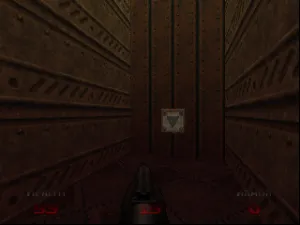
Doom 64 (Europe) is a first-person shooter developed for the Nintendo 64, released in 1997. This title is a part of the legendary Doom franchise, which has been influential in shaping the FPS genre. Unlike the earlier PC versions, Doom 64 features unique levels and design elements tailored specifically for the console experience, showcasing the capabilities of the Nintendo 64 hardware.
In the game, players navigate through various levels, battling hordes of demons and other monsters using an array of weapons. The gameplay emphasizes exploration and resource management, as players must find keys to unlock new areas while conserving ammunition and health. Doom 64 also introduces new enemies and a distinct visual style that sets it apart from its predecessors, including enhanced graphics and atmospheric lighting.
Today, Doom 64 is worth revisiting for its nostalgic value and its unique take on the Doom formula. While it may not have the same level of recognition as other entries in the series, its gameplay mechanics and level design offer a solid experience for fans of classic shooters. Compared to similar titles of its era, Doom 64's atmosphere and pacing provide a different flavor that can be refreshing for players looking for a retro experience.
How to Play Doom 64 (Europe) Online
To get started in Doom 64, first, select a new game from the main menu. You'll begin in a hub area where you can choose different levels to tackle. The core gameplay loop involves exploring these levels, finding keys, and defeating enemies while managing your health and ammunition.
As you progress, familiarize yourself with the various weapons at your disposal. Each weapon has its strengths, and learning when to use them can be crucial. Keep an eye out for power-ups and secrets hidden throughout the levels, as they can significantly aid your survival. Remember to save often, as the game can be challenging, and you'll want to avoid losing progress.
Doom 64 (Europe) Keyboard Controls
Controls
- Arrow Keys — D-Pad / Movement
- X — A button
- S — B button
- Z — Z trigger
- A — C-Down
- Q — L shoulder
- E — R shoulder
- Enter — Start
Comments (0)