CHOOSE A VERSION
3 versions · same consoleChoose an original release, regional version, revision, bootleg or clearly labelled ROM hack/mod, then press Play. Hacks may change the gameplay. Switching versions restarts the player.
Selected: Default · USA · USA
The game loads when you press Play · press “Play Now” inside the game if it asks.
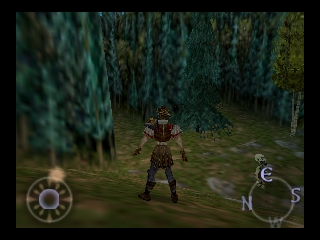
Aidyn Chronicles - The First Mage (USA)
Aidyn Chronicles - The First Mage
Aidyn Chronicles - The First Mage - RPG Classic
- Nintendo 64
- RPG
- 5· 0 votes
GAME INFO
- Platform
- Nintendo 64
- Genre
- RPG
- Released
- 1999
- Players
- 1
- Region
- USA
How to play Aidyn Chronicles - The First Mage online
CONTROLS
Controls
- Arrow Keys: D-Pad / Movement
- X: A button
- S: B button
- Z: Z trigger
- A: C-Down
- Q: L shoulder
- E: R shoulder
- Enter: Start
Aidyn Chronicles - The First Mage FAQ
Is there anything iconic or memorable about Aidyn Chronicles - The First Mage?
The game is often noted for its ambitious scope and attempt to deliver a deep RPG experience on the Nintendo 64. Its graphics and storytelling were considered impressive for the time, although it didn't achieve mainstream fame.
Does Aidyn Chronicles - The First Mage have a multiplayer or co-op mode?
There is no multiplayer or co-op mode in Aidyn Chronicles. The gameplay is designed for a single-player experience, focusing on character progression and exploration.
What makes Aidyn Chronicles - The First Mage stand out among Nintendo 64 titles of its era?
While it may not be as widely recognized as other titles on the platform, it offers a unique take on classic RPG mechanics. Its expansive world and narrative depth provide a different experience compared to more action-oriented titles of the era.
You may also like
All Nintendo 64 games











GAME INFO
- Platform
- Nintendo 64
- Genre
- RPG
- Released
- 1999
- Players
- 1
- Region
- USA
COMMENTS (0)
No comments yet. Be the first to share your thoughts.