The game loads when you press Play · press “Play Now” inside the game if it asks.
Sangokusi 1
Sangokusi 1
Sangokusi 1 on MSX1
GAME INFO
More Sangokusi Games
Ready for another round? Explore more Sangokusi games and console editions. Choose a game below to play it on its own page.
How to play Sangokusi 1 online
Getting Started
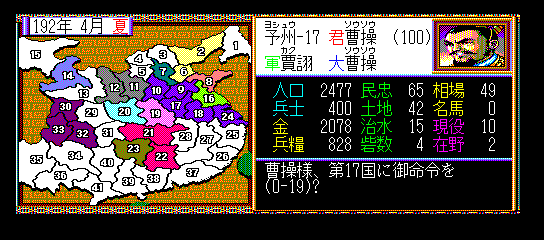
When you start Sangokusi 1, you first select a scenario and a warlord to lead. The game presents a map of ancient China divided into provinces. Your goal is to conquer all opposing factions through military force, diplomacy, and economic management.
Each turn you issue orders to your generals: recruit troops, collect taxes, form alliances, or march armies to battle. Battles play out automatically based on the commanders' stats and troop numbers. Learn the strengths of each officer and use spies to gather intelligence. The interface is entirely in Japanese, so familiarizing yourself with the menu layout through trial and error is essential if you don't read the language.
CONTROLS
Controls
- Arrow Keys: D-Pad / Movement
- X: Trigger 1
- S: Trigger 2
- Enter: Start
Sangokusi 1 FAQ
Is Sangokusi 1 exclusive to MSX 1 or did it appear on other systems?
The game was originally developed for the PC-88 and later ported to the MSX 1, FM-7, and other Japanese home computers. It also saw releases on the NES and other consoles under the title Romance of the Three Kingdoms.
Does Sangokusi 1 have a multiplayer or co-op mode?
No, this early entry is strictly a single-player experience. Many later entries in the series would add hot-seat multiplayer, but Sangokusi 1 focuses entirely on one player managing a kingdom against computer-controlled opponents.
Can players save progress in Sangokusi 1?
Many versions of Sangokusi 1 on MSX 1 rely on password systems rather than battery-backed save slots. If playing through an emulator, using save states is the most reliable way to continue a campaign without losing progress.












COMMENTS (0)
No comments yet. Be the first to share your thoughts.