The game loads when you press Play · press “Play Now” inside the game if it asks.
3D Tennis
3D Tennis
3D Tennis Overview
3D Tennis for the MSX 1 is an early attempt at bringing a tennis simulation to the 8-bit home computer. It likely dates from the mid-1980s, a period when many sports titles were experimenting with pseudo-3D graphics to stand out. The publisher and developer are not widely documented, but the game remains a curious piece of the MSX library.
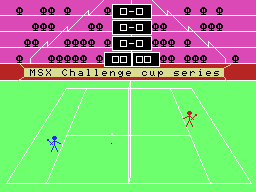
In 3D Tennis, you control a tennis player from a behind-the-court perspective, moving left and right to return shots. The core objective is to outscore your opponent by hitting the ball into their court, using timing and positioning. The game simulates basic tennis mechanics such as serving and volleying, though without the depth of modern titles.
While 3D Tennis is far from the most polished sports game on the MSX, it represents an interesting step for the platform. It is a simple, functional tennis game that can be enjoyed for a few minutes, especially if you have a fondness for early 3D attempts. It's worth a look for retro enthusiasts curious about how tennis was translated to the MSX 1.
GAME INFO
How to play 3D Tennis online
When you launch 3D Tennis, you will see a title screen and then the match begins. Use the arrow keys to move your player left and right along the baseline. Press X to swing or serve; timing matters to return the ball correctly. The game uses a simple two-button scheme.
If this is a Japanese release, menus may be in Japanese. Navigate using the D-pad and confirm with X. The goal is to win a set by scoring more points than the CPU or a second player. Keep an eye on the ball's trajectory and position yourself early to return shots effectively.
CONTROLS
Controls
- Arrow Keys: D-Pad / Movement
- X: Trigger 1
- S: Trigger 2
- Enter: Start
3D Tennis FAQ
Does 3D Tennis have a multiplayer or co-op mode?
A two-player versus mode is likely present, letting a second player compete using the keyboard. Co-op or team modes are not known.
Is 3D Tennis exclusive to MSX 1 or did it appear on other systems?
The game appears to have been released only for the MSX 1, with no documented ports to other computers or consoles.
What makes 3D Tennis stand out among MSX 1 titles of its era?
On the MSX 1, the attempt at a 3D tennis perspective was uncommon, as most sports games used simpler overhead views. This gives it a unique visual identity among early tennis sims.












COMMENTS (0)
No comments yet. Be the first to share your thoughts.