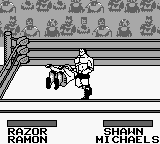
WWF King of the Ring (Japan)
WWF King of the Ring (Japan) on GB
WWF King of the Ring (Japan) is a wrestling video game released for the Game Boy. It emerged during the early 90s, a period when wrestling games were gaining traction, particularly in Japan. Developed for the handheld platform, this title stands as an official release, capturing the essence of the WWF wrestling scene of that era.
In this game, players engage in wrestling matches using various characters inspired by real-life WWF wrestlers. The gameplay structure revolves around one-on-one matches, where players must utilize a combination of attacks, grapples, and special moves to defeat their opponents. Each match unfolds in a ring, and players can also perform signature moves that reflect the personalities of the wrestlers they choose to control.
WWF King of the Ring (Japan) is worth a look for fans of retro wrestling games, especially those who appreciate the historical context of the genre. While it may not have the depth or polish of some later wrestling titles, it offers a nostalgic trip for those who grew up during the Game Boy era. It holds a place among simpler wrestling games, serving as a reminder of the genre's early days and its evolution over time.
How to Play WWF King of the Ring (Japan) Online
To get started with WWF King of the Ring (Japan), begin by selecting your wrestler from the roster. The game features Japanese menus, so new players may need to navigate through options to understand match types and settings. Once you choose your character, you can jump into a match against the AI or a friend.
The core gameplay loop involves battling through a series of matches, employing various tactics to defeat your opponent. Timing and strategy are essential, as you will need to balance offensive maneuvers with defensive techniques. Familiarizing yourself with your wrestler's moves and understanding the match mechanics will enhance your experience and improve your chances of victory.
WWF King of the Ring (Japan) Keyboard Controls
Controls
- Arrow Keys — D-Pad / Movement
- X — A button (jump / confirm)
- S — B button (run / attack / cancel)
- Enter — Start / Pause
- V — Select
Comments (0)