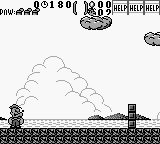
Popeye 2 (Europe)
Popeye 2 (Europe) Overview
Popeye 2 (Europe) is a platformer released for the Game Boy, adding to the legacy of the beloved Popeye franchise. This game, which was not widely documented regarding its developer or precise release details, immerses players in the classic world of Popeye and his adventures. It features gameplay elements typical of the platform genre, appealing to fans of retro gaming looking for a nostalgic experience.
In Popeye 2, players navigate through various levels filled with obstacles and enemies, utilizing Popeye's iconic abilities. The core gameplay involves jumping, running, and collecting items while avoiding hazards. Each level presents unique challenges, requiring players to master the controls to progress while also engaging with familiar characters from the franchise.
Today, Popeye 2 is worth trying for those interested in retro platformers and the history of video games. While it might not be as celebrated as other titles from the era, it offers a simple yet enjoyable gameplay experience that captures the essence of classic gaming. It's a nice addition to any retro collection, especially for fans of the Popeye series or platform games in general.
How to Play Popeye 2 (Europe) Online
Getting started in Popeye 2 involves familiarizing yourself with the basic controls outlined above. Begin by selecting your game mode on the start screen, where you will navigate through the menus to start your adventure. The gameplay primarily revolves around completing levels by jumping across platforms and collecting items, so mastering the jump and run mechanics is key.
As you progress, you'll encounter various enemies and obstacles. Timing your jumps and attacks will be crucial in overcoming challenges. Pay attention to the layout of each level and practice the controls to enhance your skills. The core loop of the game involves navigating levels, defeating enemies, and collecting items, all while aiming for the best possible score.
Popeye 2 (Europe) Keyboard Controls
Controls
- Arrow Keys — D-Pad / Movement
- X — A button (jump / confirm)
- S — B button (run / attack / cancel)
- Enter — Start / Pause
- V — Select






Comments (0)