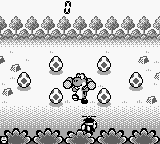
Game Boy Gallery 2 (Japan)
About Game Boy Gallery 2 (Japan)
Game Boy Gallery 2 is a compilation of classic Game & Watch titles released for the Game Boy in Japan. It was published by Nintendo, continuing the trend of bringing nostalgic arcade-style games to the handheld platform. This title is part of a series that aimed to celebrate and revive the charm of the original Game & Watch devices, making it a notable entry in the retro gaming landscape.
In this game, players can enjoy a selection of mini-games adapted from the Game & Watch series, each with its own unique mechanics and challenges. The gameplay typically involves simple, yet engaging tasks that require quick reflexes and timing, characteristic of the arcade genre. Players will navigate through various games, honing their skills and trying to achieve high scores, which is a common element in many games from this era.
What makes Game Boy Gallery 2 worth trying today is its nostalgic value and the simplicity of its gameplay. While it may not have the depth of modern titles, it offers a slice of gaming history, allowing players to experience the charm of early handheld gaming. Compared to other games of its time, it serves as a reminder of how far gaming has come, while still providing a fun, albeit straightforward, gaming experience that can be enjoyed in short bursts.
How to Play Game Boy Gallery 2 (Japan) Online
To get started with Game Boy Gallery 2, first select a game from the menu. The interface is in Japanese, so navigating may take a little time if you're not familiar with the language. Once you've chosen a game, you'll be taken to the gameplay screen where you can begin playing.
The core loop involves completing various mini-games, each inspired by the original Game & Watch titles. You will need to react quickly to different challenges, aiming for high scores as you progress. Familiarity with similar arcade games can help you get the hang of the mechanics, but patience is key, especially with the language barrier.
Game Boy Gallery 2 (Japan) Keyboard Controls
Controls
- Arrow Keys — D-Pad / Movement
- X — A button (jump / confirm)
- S — B button (run / attack / cancel)
- Enter — Start / Pause
- V — Select
Comments (0)