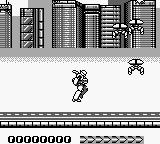
Battle Unit Zeoth (Japan)
Battle Unit Zeoth (Japan): GB Run and Gun
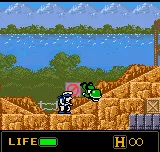
Battle Unit Zeoth is a Japanese action game released for the Game Boy. Developed by a lesser-known team, this title showcases the run-and-gun genre typical of its time. The game is notable for its distinct visuals and gameplay mechanics that reflect the era's gaming conventions, but details about its development and release are not widely documented.
In Battle Unit Zeoth, players take control of a mech unit as they navigate through various levels filled with enemies and obstacles. The gameplay revolves around shooting and dodging, with an emphasis on quick reflexes and strategic movement. While the mechanics may not be groundbreaking, they offer an engaging experience that captures the essence of early handheld gaming.
Today, Battle Unit Zeoth holds a niche appeal for fans of retro gaming and those looking to explore lesser-known titles. It may not compete with iconic franchises, but it offers a glimpse into the creativity of the Game Boy era. For collectors and enthusiasts, this game is a testament to the variety of experiences available on the platform, making it worth a try for those interested in the history of handheld gaming.
How to Play Battle Unit Zeoth (Japan) Online
Getting started with Battle Unit Zeoth involves selecting your game mode and understanding the basic mechanics. As a player, you'll primarily focus on maneuvering your mech and engaging enemies through a combination of shooting and strategic movement. The menus are in Japanese, so familiarity with the language or basic navigation skills will help you get started smoothly.
The core gameplay loop consists of progressing through levels, defeating enemies, and upgrading your mech as you advance. Pay attention to your surroundings, as enemy placements and projectiles can be challenging. While the game may not have extensive tutorials, experimenting with controls and mechanics will help you grasp the gameplay quickly.
Battle Unit Zeoth (Japan) Keyboard Controls
Controls
- Arrow Keys — D-Pad / Movement
- X — A button (jump / confirm)
- S — B button (run / attack / cancel)
- Enter — Start / Pause
- V — Select

![Metal Slug 5 Plus (bootleg) [Bootleg]](/images/default-game-thumb.webp)
Comments (0)