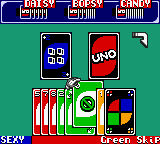
Uno (Europe) (En,Fr,De,Es,It,Nl)
About Uno (Europe) (En,Fr,De,Es,It,Nl)
Uno on Game Boy Color is a portable adaptation of the classic card game that has been a staple at family gatherings for decades. Released in Europe with support for five languages (English, French, German, Spanish, Italian, and Dutch), this version brings the familiar matching and shedding gameplay to Nintendo's handheld. The exact developer and publisher are not widely documented, but the cartridge belongs to the late 1990s or early 2000s wave of digital card games that aimed to replicate the experience of a physical deck on a small screen.
Gameplay revolves around the standard Uno rules: each player is dealt a hand of cards, and on your turn you must play a card that matches the current top card either by color, number, or symbol. Action cards like Skip, Reverse, Draw Two, and Wilds add strategic twists, while the goal is to be the first to empty your hand. The GBC version likely supports multiple human players via link cable, though the singleplayer mode may pit you against AI opponents. I don't have details on specific button mappings for in-game actions, but navigating menus and selecting cards is straightforward.
What makes this release worth trying today is its convenience: a faithful digital Uno in your pocket, without needing to shuffle or keep track of a physical deck. It's a simple, social game that works well in short bursts, and the inclusion of multiple languages shows a broad audience was intended. It's not a deep or complex title; rather, it's a comfortable port of a universally known party game that fits the Game Boy Color's library of casual, pick-up-and-play experiences.
How to Play Uno (Europe) (En,Fr,De,Es,It,Nl) Online
Getting Started
First, start the game and select your language from the title screen using the D-Pad and confirm with the A button (X on keyboard). You will be asked to choose the number of players (human and CPU). Set at least one human player to control your hand. The core loop is simple: each turn you must play a card that matches the top of the discard pile either by color, number, or symbol. Use the D-Pad to highlight a card in your hand and press A to play it. If you cannot play, press the Select button (V) to draw a card from the deck. Special cards like Skip, Reverse, Draw Two, and Wilds follow the usual Uno rules. The first player to empty their hand wins the round. There is no save feature in Uno for Game Boy Color; each game is played to completion in one session. If you are playing with a single Joypad, the CPU opponents will take their turns automatically. Keep an eye on your remaining cards and try to get rid of high-number cards early. The game ends when one player runs out of cards, and a final score tally may appear.Uno (Europe) (En,Fr,De,Es,It,Nl) Keyboard Controls
Controls
- Arrow Keys: D-Pad / Movement
- X: A button (jump / confirm)
- S: B button (run / attack / cancel)
- Enter: Start / Pause
- V: Select
Comments (0)