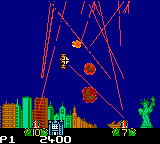
Missile Command (Europe)
About Missile Command (Europe)
Missile Command (Europe) is the Game Boy Color adaptation of the legendary 1980 arcade original. Released during the handheld's twilight years, this version brings the classic missile defense action to a portable screen. While the exact publisher and developer aren't widely documented for this specific European release, the game faithfully recreates the core experience of the arcade classic, which was originally created by Atari and designed by Dave Theurer. It's a straightforward port aimed at retro enthusiasts and newcomers alike, letting you defend cities from incoming nuclear missiles on the go.
How to Play Missile Command (Europe) Online
Getting Started
When you start Missile Command on Game Boy Color, you control three missile batteries placed across the bottom of the screen. Your goal is to intercept waves of incoming missiles that rain down from the top. Each battery has a limited supply of anti-missiles, so you need to conserve and aim carefully. Use the D-Pad to move a crosshair cursor around the screen, then press the A button to fire a counter-missile from the nearest battery toward that spot.
The core loop is simple but tense: enemy missiles appear in groups, and you must prioritize which ones to destroy. If any missile lands, it wipes out a section of your city or a battery. You have three bases (cities) to protect; lose them all and the game ends. Some versions also include bonus points for shooting down planes or extra missiles. The game increases difficulty with faster and more numerous missiles as you progress.
New players should focus on firing early and leading targets, as missiles travel in a straight line. Don't waste shots on missiles that are already too close to the ground. The Game Boy Color version retains the arcade's score-based progression, and there is no save feature each session is a fresh challenge. If you're used to the arcade, the controls feel slightly different on a small screen but remain responsive.
Missile Command (Europe) Keyboard Controls
Controls
- Arrow Keys: D-Pad / Movement
- X: A button (jump / confirm)
- S: B button (run / attack / cancel)
- Enter: Start / Pause
- V: Select
Comments (0)