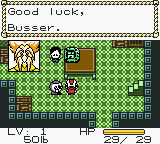
The game loads when you press Play · press “Play Now” inside the game if it asks.
Metal Walker (USA)
Metal Walker
Getting to Know Metal Walker
- Game Boy Color
- RPG
- 5· 0 votes
GAME INFO
- Platform
- Game Boy Color
- Genre
- RPG
- Developer
- Capcom
- Released
- 1999
- Players
- 1
- Region
- USA
How to play Metal Walker online
Getting Started
When you start Metal Walker, you are dropped into a small town with a few NPCs and a basic tutorial. Talk to everyone to learn the controls and pick up your first robot companion. The core loop involves moving between towns and dungeons, fighting random encounters, and upgrading your party with better robots and equipment.
Pay attention to the robot capture system: after weakening an enemy robot, you can attempt to capture it and add it to your team. Experiment with different robot combinations to find effective strategies against tougher foes. Save often using the in-game save option, as the game does not offer auto-save.
CONTROLS
Controls
- Arrow Keys: D-Pad / Movement
- X: A button (jump / confirm)
- S: B button (run / attack / cancel)
- Enter: Start / Pause
- V: Select
Metal Walker FAQ
Who developed Metal Walker?
The developer of Metal Walker is not widely documented in public sources. It was published for the Game Boy Color but the original development studio is not commonly noted.
Does Metal Walker have a multiplayer or co-op mode?
Metal Walker is a single-player only experience. There is no multiplayer or co-op mode included in the game.
Is there anything iconic or memorable about Metal Walker?
Metal Walker is remembered for its robot-collecting mechanic, which sets it apart from typical RPGs of the time. Its compact size and straightforward gameplay make it a neat piece of the Game Boy Color library for turn-based RPG fans.
You may also like
All Game Boy Color games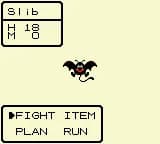
GAME INFO
- Platform
- Game Boy Color
- Genre
- RPG
- Developer
- Capcom
- Released
- 1999
- Players
- 1
- Region
- USA
COMMENTS (0)
No comments yet. Be the first to share your thoughts.