The game loads when you press Play · press “Play Now” inside the game if it asks.
Honkaku Taisen Shougi Ayumu (Japan)
Honkaku Taisen Shougi Ayumu
Honkaku Taisen Shougi Ayumu Overview
- Game Boy Color
- Board Game
- 5· 0 votes
GAME INFO
- Platform
- Game Boy Color
- Genre
- Board Game
- Players
- 1-2
- Region
- Japan
How to play Honkaku Taisen Shougi Ayumu online
Getting Started
When you first launch Honkaku Taisen Shougi Ayumu, you'll be greeted by a Japanese title screen. Press Start to proceed to the main menu. The menu options are written in kanji and hiragana, but they typically offer choices like "New Game" (対局開始), "Two-Player Game" (二人対局), "Load Game" (データロード), and "Settings" (設定). Select the top option for a single-player match against the computer. You'll then choose difficulty level - usually indicated by numbers (1 being easiest, 4 or 5 hardest) or terms like 弱い (weak) and 強い (strong).
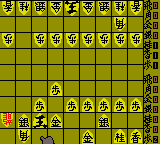
The core gameplay is turn-based shogi. You control the bottom half of the board (your pieces are usually white/light colored). Use the D-Pad to move a cursor over your piece, press the A button to pick it up, then move it to a valid square and press A again to drop it. To drop a captured piece back onto the board, you first press Select to bring up the captured piece menu, then pick the piece with A, move it to an empty square, and confirm. The game will show valid moves when you select a piece (highlighted squares). The goal is to checkmate the opponent's king. If you're new to shogi, it helps to know the piece movements - you can find a quick reference online or learn as you play by trial and error.
CONTROLS
Controls
- Arrow Keys: D-Pad / Movement
- X: A button (jump / confirm)
- S: B button (run / attack / cancel)
- Enter: Start / Pause
- V: Select
Honkaku Taisen Shougi Ayumu FAQ
Which regions was Honkaku Taisen Shougi Ayumu released in?
This title was released exclusively in Japan. No official versions for North America or Europe exist, so it is considered a Japanese import for the Game Boy Color.
Roughly how long does it take to finish Honkaku Taisen Shougi Ayumu?
There is no traditional campaign mode, so playtime depends entirely on individual matches. A single game against a competent AI can last anywhere from 15 minutes to over an hour if both sides play cautiously. For most players, finishing a match is the goal each session.
In what year was Honkaku Taisen Shougi Ayumu originally released?
The exact original release year is not widely documented. It appeared on the Game Boy Color sometime during the system's lifecycle, likely in the late 1990s or early 2000s, but no precise date is commonly cited.
You may also like
All Game Boy Color games











GAME INFO
- Platform
- Game Boy Color
- Genre
- Board Game
- Players
- 1-2
- Region
- Japan
COMMENTS (0)
No comments yet. Be the first to share your thoughts.