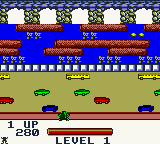
Frogger (Europe) (En,Fr,De,Es,It,Nl)
Frogger (Europe) (En,Fr,De,Es,It,Nl) Overview
Frogger on Game Boy Color is a faithful port of the classic 1981 arcade hit. This European release supports English, French, German, Spanish, Italian, and Dutch, making it accessible to a wide audience. It's a straightforward arcade conversion that brings the same simple, addictive challenge to Nintendo's handheld.
The objective is pure: guide your frog across a busy highway, dodging cars and trucks, then cross a dangerous river by hopping on logs and turtles without falling in. Each level increases the difficulty with faster traffic and trickier river patterns. You only have a limited number of lives, and one mistake means starting over from the beginning of the stage.
This version holds up well as a portable tribute to an arcade legend. The graphics are clear and colorful for the GBC, and the controls are responsive. If you enjoy timeless arcade action that tests your timing and patience, this Frogger port delivers exactly that without any unnecessary frills.
How to Play Frogger (Europe) (En,Fr,De,Es,It,Nl) Online
Getting Started
When you start the game, you'll see a title screen. Press Enter to begin. Your goal is to move your frog from the bottom of the screen to the top by crossing two hazards: first a road with speeding cars, then a river with moving logs and turtles.
Use the D-Pad to move in four directions. Tap the A button to jump onto a log or to enter a safe spot. Time your moves carefully - cars come in unpredictable patterns, and logs sink or float away. You can also eat flies that appear for bonus points, but the main focus is survival.
The game is relentless: one hit or fall means losing a life. You start with a few lives, and losing all ends the run. The difficulty ramps up quickly, so practice patience and learn the rhythm of each level. There's no save feature, so it's all about high score chasing.
Frogger (Europe) (En,Fr,De,Es,It,Nl) Keyboard Controls
Controls
- Arrow Keys: D-Pad / Movement
- X: A button (jump / confirm)
- S: B button (run / attack / cancel)
- Enter: Start / Pause
- V: Select
Comments (0)