Zelda no Densetsu - The Hyrule Fantasy (Japan) (Collector's Edition)
About Zelda no Densetsu - The Hyrule Fantasy (Japan) (Collector's Edition)
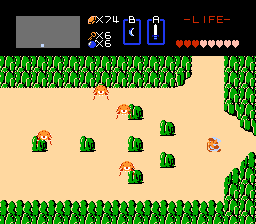
This is Zelda no Densetsu - The Hyrule Fantasy, the original Japanese release of what western players know as The Legend of Zelda. It came out for the Famicom Disk System in 1986, published and developed by Nintendo. This particular version is labeled as a Collector's Edition, likely a reprint or bundled disk release that retains the same core experience. It's an action-adventure title that helped define the genre on Nintendo's console, using the disk system's rewritable media for save data rather than passwords.
How to Play Zelda no Densetsu - The Hyrule Fantasy (Japan) (Collector's Edition) Online
Start the game and you will see a title screen in Japanese. Press Start to begin. You control Link in a top-down overworld filled with enemies, rocks, and bushes. Your first goal is to find a sword, which is hidden in a cave somewhere on the map. Walk into the cave entrance to receive it. From there, explore the overworld, enter dungeons, collect items like bombs and the boomerang, and defeat bosses to obtain pieces of the Triforce.
The game saves your progress automatically to the Famicom Disk System disk. You can power off and continue later. Menus are in Japanese, but the interface is simple: press Start to open the inventory, then use the D‑Pad to select an item and press A to equip it. Combat is straightforward: press the B button to swing your sword or use the equipped item. Experiment with burning bushes and pushing statues to discover secrets.
If you get stuck, talk to the old men in caves for hints. The overworld is large but interconnected. Most dungeons require a specific item to complete, so explore thoroughly. Remember that the game expects you to try using items in different places.
Zelda no Densetsu - The Hyrule Fantasy (Japan) (Collector's Edition) Keyboard Controls
Controls
- Arrow Keys: D-Pad / Movement
- X: A button (jump / confirm)
- S: B button (run / attack / cancel)
- Enter: Start / Pause
- V: Select





Comments (0)