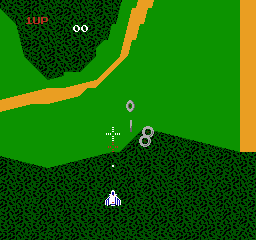
The game loads when you press Play · press “Play Now” inside the game if it asks.
Xevious (Japan) (Disk Writer)
Xevious
Xevious on FDS
- Famicom Disk System
- Shooter
- 5· 0 votes
GAME INFO
- Platform
- Famicom Disk System
- Genre
- Shooter
- Players
- 1
- Region
- Japan
- Version
- Disk Writer
How to play Xevious online
Getting Started
When you start Xevious on the FDS, you'll see a title screen with Japanese text. Press Start (Enter) to begin. There are no menu options to speak of, so you will jump straight into the action. Your ship, the Solvalou, appears at the bottom of the screen. The game scrolls upward automatically, and enemies will appear both in the sky above you (brightly colored aircraft) and on the ground below (darker structures and cannons). Your two weapons are mapped to the A button (zapper for air targets) and the B button (blaster bomb for ground targets). You can only fire one type at a time, so you need to tap the appropriate button based on what is approaching.
The core loop is simple: destroy everything that moves or shoots at you while avoiding collisions and enemy fire. The blaster bomb drops a bomb that falls straight down and can destroy ground targets even after you have passed over them, so you can lead your shots. Your ship has a hit box that is smaller than its sprite, but be careful - enemy bullets and collisions will cost you a life. There are no power-ups, so your survival depends entirely on your ability to dodge and shoot precisely. The game ends when you lose all lives, but you can continue using the FDS's disk save feature if available.
Since this is the Japanese FDS version, all on-screen text is in Japanese. However, the interface is minimal: the score, high score, and remaining lives are shown with numbers and simple symbols. You don't need to read anything to play. Focus on learning the patterns of different enemy types and ground installations - some require multiple hits, and the ground towers often fire projectiles that arc upward. Practice makes perfect, and this port is just as tough as the arcade original.
CONTROLS
Controls
- Arrow Keys: D-Pad / Movement
- X: A button (jump / confirm)
- S: B button (run / attack / cancel)
- Enter: Start / Pause
- V: Select
Xevious FAQ
Who developed Xevious?
Namco developed Xevious, with the arcade version released in 1982. The Famicom Disk System port was handled internally by Namco as well.
Which regions was Xevious released in?
The original arcade version was released in Japan and North America. The Famicom Disk System version came out exclusively in Japan, as the FDS itself was a Japan-only add-on.
What makes Xevious stand out among Famicom Disk System titles of its era?
Xevious was one of the first arcade shooters to feature a two-weapon system that forced players to target both air and ground enemies simultaneously. On the FDS, it demonstrated that complex arcade action could be faithfully reproduced on home hardware, and it remains a challenging and respected title among shooter fans.
You may also like
All Famicom Disk System games Aki to Tsukasa no Fushigi no Kabe
 Yume Koujou - Doki Doki Panic
 Bishoujo Hanafuda Club Vol.2 - Koikoi Bakappana Hen
 Bishoujo Shashinkan - Studio Cut
 Bishoujo Sexy Slot
 Bishoujo Hanafuda Club Vol.1 - Oichokabu Hen
 Transformers - The Headmasters
 Bakutoushi Patton-kun
 Aliens - Alien 2
 Tenshitachi no Houkago
 Backgammon
 Chitei Tairiku Ordola
GAME INFO
- Platform
- Famicom Disk System
- Genre
- Shooter
- Players
- 1
- Region
- Japan
- Version
- Disk Writer
COMMENTS (0)
No comments yet. Be the first to share your thoughts.