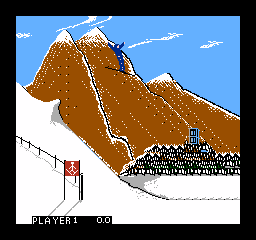
The game loads when you press Play · press “Play Now” inside the game if it asks.
Winter Games (Japan)
Winter Games
About Winter Games
- Famicom Disk System
- Sports
- 5· 0 votes
GAME INFO
- Platform
- Famicom Disk System
- Genre
- Sports
- Publisher
- Epyx
- Developer
- Epyx
- Released
- 1985
- Region
- Japan
How to play Winter Games online
Getting Started
When the game boots, you will see a title screen. Press Enter to start, then use the D-Pad and A button (X key) to navigate through the menus. The main menu presents options like "Game Start," "Event Select," and "Options." Since this is a Japanese-only release, all text is in Japanese, so you may need to experiment or refer to a translation guide. Typically, selecting "Game Start" takes you to an event selection screen, where you can choose which winter sport to play.
Each event has its own rules and controls. For example, in skiing, you might need to push up repeatedly to accelerate, then steer left or right. In speed skating, rhythmic button pressing is key. The core loop is: pick an event, perform, view your result, and move to the next. You can play through all events in a full competition or replay individual events for practice. After finishing all events, your total score is displayed.
If you get stuck, try pressing Select (V key) to pause or adjust settings. The disk-based nature means your progress can be saved to the disk if you see a save prompt, though the exact method varies. Take your time learning each event's timing - the game rewards precision over speed.
CONTROLS
Controls
- Arrow Keys: D-Pad / Movement
- X: A button (jump / confirm)
- S: B button (run / attack / cancel)
- Enter: Start / Pause
- V: Select
Winter Games FAQ
Who developed Winter Games?
The original Winter Games concept was created by Atari Games for arcades, but the specific developer for the Famicom Disk System port is not widely documented. It was likely handled by a Japanese studio familiar with the platform, but no official credit is commonly listed.
Can players save progress in Winter Games?
Yes, the Famicom Disk System saves game data directly to the disk. When you select a save option in the menu (often indicated by a floppy disk icon), your scores and event progress are written to the disk for later continuation.
Roughly how long does it take to finish Winter Games?
A full playthrough of all events usually takes between 30 to 45 minutes, depending on your skill level. Repeating events for better scores or playing with a second player can extend the session to over an hour.
You may also like
All Famicom Disk System games Aki to Tsukasa no Fushigi no Kabe
 Yume Koujou - Doki Doki Panic
 Bishoujo Hanafuda Club Vol.2 - Koikoi Bakappana Hen
 Bishoujo Shashinkan - Studio Cut
 Bishoujo Sexy Slot
 Bishoujo Hanafuda Club Vol.1 - Oichokabu Hen
 Transformers - The Headmasters
 Bakutoushi Patton-kun
 Aliens - Alien 2
 Tenshitachi no Houkago
 Backgammon
 Chitei Tairiku Ordola
GAME INFO
- Platform
- Famicom Disk System
- Genre
- Sports
- Publisher
- Epyx
- Developer
- Epyx
- Released
- 1985
- Region
- Japan
COMMENTS (0)
No comments yet. Be the first to share your thoughts.