Capcom Sports Club (970722 Hispanic)
Capcom Sports Club (970722 Hispanic) Overview
Capcom Sports Club is an arcade sports compilation released by Capcom in 1997. This particular version, labeled "970722 Hispanic," was distributed in Spanish-speaking territories and features localized text. The game packs three distinct sports mini-games into one cabinet: soccer, tennis, and basketball. It was designed for quick, pick-up-and-play sessions typical of the late 90s arcade scene, offering a lighter alternative to the more simulation-focused sports games of the era.
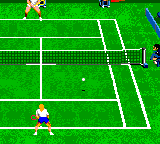
When you drop a coin in, you first choose which sport to play. Soccer is a top-down five-on-five match with simplified passing and shooting. Tennis is a side-view singles game where timing your swing matters more than positioning. Basketball is a vertical court two-on-two game with fast breaks and three-point shots. Each sport uses the same basic control scheme (one button for action, one for movement) but adapts the mechanics to fit the sport. Matches are short, typically lasting a few minutes, and you can play solo against the CPU or with a friend in versus mode.
Today, Capcom Sports Club holds up as a fun, no-frills arcade experience. Its variety means you never get bored of a single sport, and the bite-sized matches make it perfect for a quick online session. It lacks the depth of dedicated sports sims, but that simplicity is part of its charm. If you enjoy classic Capcom arcade titles or want a taste of late-90s sports gaming without the complexity, this one is worth a few credits. The Hispanic version adds a layer of regional interest for collectors and Spanish-speaking players.
How to Play Capcom Sports Club (970722 Hispanic) Online
Getting Started
When the game boots up, you'll see a title screen followed by a menu to choose your sport. Use the D-Pad to highlight soccer, tennis, or basketball, then press X to confirm. If you're playing on the Hispanic version, the menus are in Spanish, but the layout is the same: "Fútbol" for soccer, "Tenis" for tennis, and "Baloncesto" for basketball. You can pick single-player mode ("1 Jugador") or two-player versus ("2 Jugadores").
Each sport has a simple loop: try to score more points than your opponent within the time limit. In soccer, you control a single player and pass to teammates automatically when you have the ball - press S to shoot or pass. In tennis, move your player with the D-Pad and press S to swing; timing and positioning determine where the ball goes. Basketball is the most frantic, with fast movement and a jump shot mapped to X. You can also steal the ball by pressing S when near an opponent.
There's no deep strategy here - just pick a sport, learn the one-button controls, and enjoy the arcade action. The game is designed for quick sessions, so don't expect lengthy tutorials. If you get stuck on a menu, remember that pressing Enter starts the match and V toggles options in some screens. The Hispanic version uses standard Spanish gaming terms, so even if you don't speak Spanish, the icons and layout are intuitive enough to navigate.
Capcom Sports Club (970722 Hispanic) Keyboard Controls
Controls
- Arrow Keys: Joystick / Movement
- X: Button 1
- S: Button 2
- Z: Button 3
- A: Button 4
- Q: Button 5
- E: Button 6
- Enter: Start / 1P
- V: Coin / Insert





Comments (0)