Capcom Sports Club (970722 Asia)
Getting to Know Capcom Sports Club (970722 Asia)
Capcom Sports Club is an arcade sports compilation released by Capcom in 1997. The "970722 Asia" revision specifically targets Asian markets and features a selection of athletic events designed for quick, competitive play. Originally developed for Capcom's CPS-2 hardware, this title stands alongside other arcade sports experiments from the late 90s, though it remains one of the company's more obscure releases.
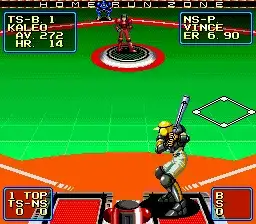
Players take control of a team in a series of sports matches, with the arcade cabinet allowing up to two participants to compete head-to-head. The game includes volleyball and basketball events, each with simplified controls that emphasize timing and positioning over complex strategies. Matches are fast, typically lasting only a few minutes, and the objective is to outscore the opponent within the time limit.
For fans of retro arcade sports games, Capcom Sports Club offers a charmingly straightforward experience. It lacks the depth of dedicated sports simulators but makes up for it with pick-up-and-play accessibility. The game's visual style and sound design are typical of mid-90s Capcom arcade titles, and it provides a nice glimpse into how the company approached sports gaming before moving to other genres. It's worth a few rounds if you enjoy arcade sports with simple mechanics.
How to Play Capcom Sports Club (970722 Asia) Online
Getting Started
When you boot up Capcom Sports Club, you will first see a title screen. Press Start (Enter key) to proceed to the main menu. From there, select either the volleyball or basketball event. The game may present a language selection or region option - the Asia revision likely defaults to English or Japanese text. Use the D-Pad to highlight your choice and confirm with the A button (X key).
Each sport plays similarly: control your character with the D-Pad, press the B button (S key) to pass or shoot, and use the A button (X key) to jump or serve. The core loop is simple - win matches by scoring more points than your opponent within the time limit. Computer opponents offer moderate challenge, but the real fun is in two-player versus mode. Menus are sparse but intuitive; experiment with buttons to find the action you need. If text is in Japanese, remember that the top option is usually "start game" and the bottom is "options."
Capcom Sports Club (970722 Asia) Keyboard Controls
Controls
- Arrow Keys: Joystick / Movement
- X: Button 1
- S: Button 2
- Z: Button 3
- A: Button 4
- Q: Button 5
- E: Button 6
- Enter: Start / 1P
- V: Coin / Insert
Comments (0)