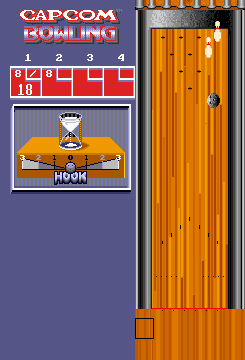
Capcom Bowling (set 4)
What is Capcom Bowling (set 4)?
Capcom Bowling is an arcade sports game that first rolled into bowling alleys and arcades in 1988. Developed and published by Capcom, it's one of the company's less-heralded titles, focusing entirely on ten-pin bowling simulation. This particular version, often labeled "set 4," appears to be a later ROM revision with minor adjustments - likely balancing or bug fixes - rather than a full-fledged sequel or mod. The game uses a standard arcade cabinet with a trackball and buttons, letting you aim and spin the ball just like a real lane.
You step up to the lane and face a familiar bowling screen: a top-down view of the alley with pins at the far end. Using the trackball, you set your aim by moving a cursor left or right, then you pull back on the ball and release it by pressing the button. You can add spin by moving the trackball sideways during the throw, affecting the ball's hook. The game tracks your score automatically and throws are simple. It's a no-frills recreation of the sport, without power-ups or gimmicks - just you, the ball, and the pins.
Compared to other bowling titles of the era, Capcom Bowling feels solid and responsive, though it doesn't try to dazzle with graphics or modes. Its appeal today is as a straightforward two-player arcade experience - perfect for a quick game with a friend. The "set 4" revision doesn't introduce radical changes, so if you've played any version of Capcom Bowling, you know what to expect. It's a niche title within Capcom's library but a genuine piece of late-80s arcade bowling history.
How to Play Capcom Bowling (set 4) Online
Getting Started
Before you start a game, press the Start button (Enter) on the title screen. If multiple players are joining, each player presses Start to add their name. The game will then prompt you to enter a player name (optional) and begin the first frame.
The core loop is simple: aim your ball using the Arrow Keys to move the cursor left and right on the lane. Hold down the A button (X on keyboard) to begin your approach - a power meter will fill up. Release the button at the desired power level to throw. While the ball is rolling, you can apply spin by pressing left or right on the Arrow Keys, making the ball curve. You get two throws per frame unless you get a strike.
Pay attention to the pin layout after your first throw. If you leave spares, you can adjust your aim and spin accordingly. The game keeps score automatically, so just focus on your aim and timing. It plays like a realistic bowling sim from the late 80s, with no extra mechanics to worry about. If you're new, start with straight throws down the center to get a feel for the power meter and lane response.
Capcom Bowling (set 4) Keyboard Controls
Controls
- Arrow Keys: Joystick / Movement
- X: Button 1
- S: Button 2
- Z: Button 3
- A: Button 4
- Q: Button 5
- E: Button 6
- Enter: Start / 1P
- V: Coin / Insert
Comments (0)