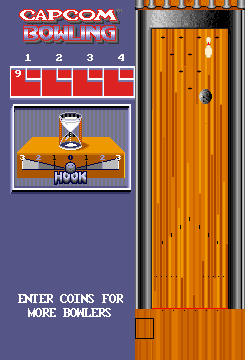
Capcom Bowling (set 3)
About Capcom Bowling (set 3)
Capcom Bowling (set 3) is a revision of the classic arcade bowling title from Capcom, originally released in 1988. This version likely includes tweaks to gameplay or scoring compared to earlier sets, but the core remains the same: a straightforward, realistic-ish bowling simulator made for the arcades. It ran on Capcom's CPS-1 hardware, though the game itself is fairly simple compared to the company's fighting games. Set 3 is essentially a later build, not a different game, so if you've played any Capcom Bowling cabinet, you'll recognize it immediately.
How to Play Capcom Bowling (set 3) Online
Getting Started
To start a game in Capcom Bowling, press Enter to insert a coin and then press Start. You will be prompted to enter your name (high score initials) and then you can begin bowling. The game follows standard ten-pin bowling rules: you have two rolls per frame to knock down ten pins, with spares and strikes scoring bonus points.
Use the arrow keys to position your bowler left or right on the lane, then press the A button (X) to start the ball throw. A power meter will appear; press A again to set the speed, then use left/right to control the hook. Timing is critical for accuracy. The game does not have complex special moves - it's pure bowling simulation with an arcade feel.
If you are playing alone, the game will pit you against the computer with an automated opponent. For multiplayer, you can take turns with friends. The controls are simple enough to pick up quickly, but mastering the spin and speed takes practice.
Capcom Bowling (set 3) Keyboard Controls
Controls
- Arrow Keys: Joystick / Movement
- X: Button 1
- S: Button 2
- Z: Button 3
- A: Button 4
- Q: Button 5
- E: Button 6
- Enter: Start / 1P
- V: Coin / Insert
Comments (0)