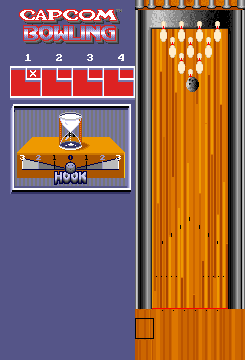
Capcom Bowling (set 2)
Inside Capcom Bowling (set 2)
Capcom Bowling is an arcade sports title released by Capcom in 1988. It arrived during the golden age of arcade bowling simulators, offering a straightforward yet addictive take on the sport. This particular entry is marked as 'set 2,' which typically indicates a different ROM revision or regional variant of the original arcade board. The game appeared in both Japanese and North American arcades, capitalizing on the simple appeal of knocking down pins with a tracked ball.
How to Play Capcom Bowling (set 2) Online
Getting Started
Insert a coin by pressing the Select button (V) or the default coin key (5 or 6 depending on emulator settings). Then press Start (Enter) to begin a game. You'll be prompted to select a lane and possibly set the number of players. The game supports up to two players taking turns.
Core gameplay revolves around positioning your bowler with the D-Pad, then pressing the A button (X) to begin the approach. Timing and precision matter: you must release the ball at the right moment and use the D-Pad to add spin or adjust the hook. The power meter appears on screen - press the A button again to lock in power and another time to set spin. Each frame consists of two rolls unless you get a strike. The goal is to knock down all ten pins for the highest score.
New players should practice the timing of the approach and the power meter. The game's feedback is immediate, and the simple controls make it easy to pick up but challenging to master. There are no complex menus or instructions beyond the initial coin insert, and any on-screen text is in English, so navigation is straightforward.
Capcom Bowling (set 2) Keyboard Controls
Controls
- Arrow Keys: Joystick / Movement
- X: Button 1
- S: Button 2
- Z: Button 3
- A: Button 4
- Q: Button 5
- E: Button 6
- Enter: Start / 1P
- V: Coin / Insert
Comments (0)