CHOOSE A VERSION
4 versions · same consoleChoose an original release, regional version, revision, bootleg or clearly labelled ROM hack/mod, then press Play. Hacks may change the gameplay. Switching versions restarts the player.
Selected: Default · set 1
The game loads when you press Play · press “Play Now” inside the game if it asks.
Capcom Bowling (set 1)
Capcom Bowling
Capcom Bowling Overview
GAME INFO
How to play Capcom Bowling online
Getting Started
When you first boot Capcom Bowling, you'll see a screen that asks how many players will be playing. Use the cursor (mapped to arrow keys) to choose between one and four players, then press the A button (X key) to confirm. If you're playing solo, you'll simply select your name from a list of pre-entered initials or enter your own. After that, you immediately step onto the lanes.
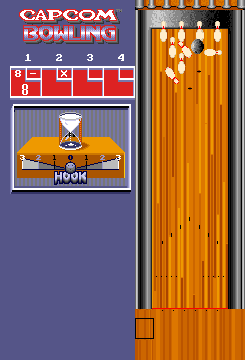
The core loop is simple: aim your ball, set your power, and add spin if you want. Use the arrow keys to move the aiming cursor left or right across the lane. Once you're satisfied with your position, press and hold the A button to start the power meter. Release A to lock in your power - the earlier in the meter's cycle you release, the weaker the throw. Just before the ball is released, you can tap a direction on the arrow keys to apply hook (curving the ball left or right), which helps you hit the pocket for strikes.
If this is your first time, start by focusing on straight throws down the middle to learn the sweet spot for power. Spare conversions are where the subtlety comes in - you'll need to compensate for the oil pattern (represented by subtle lane friction indicators) to consistently pick up spares. The game tracks your score automatically and does not have a time limit per turn, so take your time lining up shots. Everything is in English, so there are no language barriers to worry about.
CONTROLS
Controls
- Arrow Keys: Joystick / Movement
- X: Button 1
- S: Button 2
- Z: Button 3
- A: Button 4
- Q: Button 5
- E: Button 6
- Enter: Start / 1P
- V: Coin / Insert
Capcom Bowling FAQ
Who developed Capcom Bowling?
Capcom developed and published Capcom Bowling internally. The game was part of Capcom's early arcade lineup, created by their internal teams before they became famous for franchises like Street Fighter.
Can players save progress in Capcom Bowling?
No, Capcom Bowling does not support saving. It is an arcade title designed for short sessions - once you leave the machine, all scores and progress are lost. High scores are displayed on a leaderboard during that play session only.
What makes Capcom Bowling stand out among Arcade titles of its era?
Its use of a trackball for aiming gave it a tactile feel that many button-based bowling games lacked. The clean visual presentation and responsive controls made it a reliable crowd-pleaser in arcades, while its four-player alternating mode allowed groups to compete without needing extra cabinets.












COMMENTS (0)
No comments yet. Be the first to share your thoughts.