The game loads when you press Play · press “Play Now” inside the game if it asks.
Brix
Brix
Brix Overview
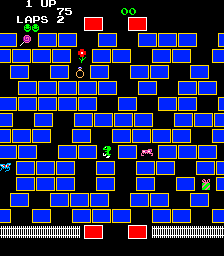
The player controls a cursor to move and rotate tiles on a grid filled with various colored blocks. The goal is to clear the board by matching pairs of identical blocks. Blocks can be moved horizontally or vertically, but they are subject to gravity - when a block is removed, any blocks above it fall down, potentially creating chain reactions. The challenge comes from planning moves carefully, as blocks can only be matched if they are connected in a straight line with no obstacles. There is no time limit, so each puzzle rewards careful thinking over speed.
Brix remains a solid entry in the puzzle genre, especially for fans of Puzznic or similar tile-matching games. It's not flashy, but the level design is tight and the gradual difficulty curve keeps it engaging. The enhanced 1992 version adds more levels and a level editor, which extends replayability. If you enjoy brain-teasers that demand patience and spatial reasoning, Brix is worth a look.
GAME INFO
- Platform
- Arcade
- Genre
- Puzzle
- Publisher
- Epic Games
- Developer
- Michael Riedel
- Released
- 1991
- Players
- 1
- Made by
- Michael Riedel
How to play Brix online
Getting Started
When you start Brix, you will see a title screen. Press Enter to begin. The game presents a grid filled with colored blocks. Your goal is to clear the entire board by matching pairs of identical blocks. Use the arrow keys to move the cursor over a block, then press X to select it. Move the cursor to an adjacent empty space or to another block of the same color to swap them. Blocks must be directly adjacent horizontally or vertically to be swapped. After swapping, if two identical blocks are now adjacent in a straight line with no gaps, they will be removed and the blocks above will fall down.
The core loop is simple: examine the board, plan your moves to create matches, and clear all blocks to advance to the next level. Some levels include obstacles like fixed blocks or walls that cannot be moved. If you get stuck, you can press Select to restart the current level. There is no timer, so take your time. The game keeps track of your progress level by level, but note that saving progress may not be available in this browser version.
CONTROLS
Controls
- Arrow Keys: Joystick / Movement
- X: Button 1
- S: Button 2
- Z: Button 3
- A: Button 4
- Q: Button 5
- E: Button 6
- Enter: Start / 1P
- V: Coin / Insert
Brix FAQ
Can players save progress in Brix?
Brix does not include a built-in save feature in its original MS-DOS version. Browser emulation might offer save states, but the game itself relies on level passwords or simply starting from the beginning each session.
Does Brix have a multiplayer or co-op mode?
No, Brix is strictly a single-player puzzle game. There is no option for two players or cooperative play. Every level is designed for one person to solve alone.
Is Brix exclusive to Arcade or did it appear on other systems?
Brix originally released on MS-DOS in 1991, so it is not exclusive to Arcade. The arcade version seen on this site is likely the DOS game running under emulation. It also saw an enhanced re-release for DOS in 1992 by Epic MegaGames.
You may also like
All Arcade games











GAME INFO
- Platform
- Arcade
- Genre
- Puzzle
- Publisher
- Epic Games
- Developer
- Michael Riedel
- Released
- 1991
- Players
- 1
- Made by
- Michael Riedel
COMMENTS (0)
No comments yet. Be the first to share your thoughts.