CHOOSE A VERSION
3 versions · same consoleChoose an original release, regional version, revision, bootleg or clearly labelled ROM hack/mod, then press Play. Hacks may change the gameplay. Switching versions restarts the player.
Selected: Default · Japan · Japan
The game loads when you press Play · press “Play Now” inside the game if it asks.
Block Out (Japan)
Block Out
Block Out Overview
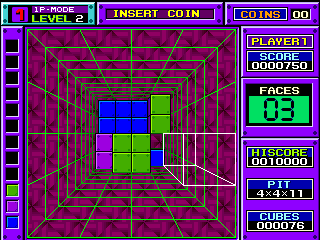
Instead of a single flat playfield, Block Out hands you a transparent box viewed from above at an angle. Three-dimensional polyominos - essentially 3D Tetris pieces - fall from above, and you rotate them along multiple axes before letting them settle. The goal is to fill complete horizontal layers, which then disappear to free up space. You can also slide pieces along the X and Y axes, giving you more control than in standard block games. The challenge ramps up quickly as the block speed increases and the depth of the box makes it harder to spot gaps.
Block Out remains a fascinating footnote in puzzle history because it attempted what few other games did at the time: bringing Tetris into three dimensions without overcomplicating the formula. It's not as polished or intuitive as its 2D cousins, and the isometric viewpoint can be disorienting at first. Still, for anyone curious about early 3D puzzle experiments or looking for a real mental workout, this Japanese arcade version offers a clean, no-nonsense challenge that rewards spatial thinking. It is a niche title, but a rewarding one for players who enjoy mastering unusual mechanics.
GAME INFO
- Platform
- Arcade
- Genre
- Puzzle
- Publisher
- Atari Games
- Developer
- Atari Games
- Released
- 1989
- Players
- 1
- Region
- Japan
How to play Block Out online
Getting Started
When you start Block Out, you are greeted by a title screen in English even on the Japanese version, so navigation is straightforward. Press Start (Enter) to begin the game. The play area is a rectangular 3D box seen from above at an angle. Blocks of various 3D shapes descend automatically. Your job is to rotate and position them so that they fill complete horizontal layers.
Use the D-Pad (Arrow Keys) to move the falling block along the X and Y axes - left, right, forward, and backward. Press X to rotate the block around its vertical axis, and S to rotate it around a horizontal axis. The core loop is simple: a block falls, you manipulate it into position, it locks into place, and the next block comes. Filling a full layer makes it disappear and awards points. If blocks stack up to the top of the box, the game ends.
The Japanese version plays identically to the Western release, but attract mode text is in Japanese. No language barrier exists during gameplay because menus are minimal and rely on symbols. For beginners, focus on keeping the stack as flat as possible - avoid leaving tall single columns. Also, experiment with rotating the blocks to find the best fit; the 3D rotation takes a moment to get used to but is essential for clearing layers efficiently.
CONTROLS
Controls
- Arrow Keys: Joystick / Movement
- X: Button 1
- S: Button 2
- Z: Button 3
- A: Button 4
- Q: Button 5
- E: Button 6
- Enter: Start / 1P
- V: Coin / Insert
Block Out FAQ
Who developed Block Out?
Atari Games developed the original arcade version of Block Out. The game was designed by Aleksander Ustaszewski and released in 1989.
Which regions was Block Out released in?
Block Out saw arcade releases in North America and Japan. The Japanese version, titled simply "Block Out," was distributed by Atari Games' Japanese arm with region-specific text on the title screen.
Does Block Out have a multiplayer or co-op mode?
Block Out is strictly a single-player game. There are no versus, cooperative, or two-player modes in the original arcade cabinet.
You may also like
All Arcade games











GAME INFO
- Platform
- Arcade
- Genre
- Puzzle
- Publisher
- Atari Games
- Developer
- Atari Games
- Released
- 1989
- Players
- 1
- Region
- Japan
COMMENTS (0)
No comments yet. Be the first to share your thoughts.