The game loads when you press Play · press “Play Now” inside the game if it asks.
88 Games
88 Games
About 88 Games
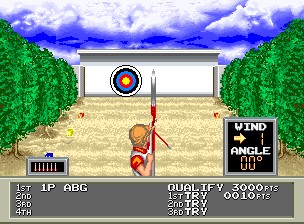
88 Games is an arcade sports game released by Konami in 1988, part of the long-running Track & Field and Hyper Sports series. It was designed for the 1988 Summer Olympics in Seoul, though it does not have an official license from the IOC. The game runs on Konami's standard arcade hardware of the era and features the same button-mashing and timing-based gameplay that made its predecessors popular in arcades worldwide. It falls under the sports genre and was released primarily in Japan and the USA.
The player competes in a series of Olympic-style track and field events by alternately pressing two buttons as fast as possible or timing button presses correctly. Events include the 100-meter dash, long jump, triple jump, archery, and others. Each event has its own mechanic - for example, running events require rapid alternating presses, while jumping events demand precise button taps for the takeoff. The game supports up to four players taking turns, with each player aiming for the best score or time to advance.
As a sequel in the Hyper Sports lineage, 88 Games is worth trying today for anyone curious about classic arcade sports. It offers simple, intense action that is easy to pick up but challenging to master. The event variety keeps the gameplay fresh, and the competitive multiplayer aspect makes it a good choice for casual gaming sessions. It is not a deep simulation but a straightforward arcade test of reflexes - what you see is what you get.
GAME INFO
How to play 88 Games online
Getting Started:
Start by inserting a coin (or pressing the select button if playing on an emulator) and then press Start to begin. The game will show an event selection screen, usually a map of Olympic rings or a list. Use the D-Pad to highlight an event and press the A button (X key) to confirm. You can also set the number of players before starting.
Once an event begins, follow the on-screen instructions. Most events require you to alternate pressing the A and B buttons rapidly to build speed, or to time a single press for actions like jumping or releasing an arrow. Practice the rhythm for each event because the timing windows can be strict. The game does not save progress, so plan to complete all events in one session or compete with friends in turn-based multiplayer.
If you fail to qualify in an event (for example, not clearing the required distance or time), you get a game over. You can continue by inserting another credit (or pressing select then start) but starting again from the beginning of the event set. The controls are responsive, so focus on quick button presses rather than complex strategies. The game is entirely in English, so menu navigation is straightforward.
CONTROLS
Controls
- Arrow Keys: Joystick / Movement
- X: Button 1
- S: Button 2
- Z: Button 3
- A: Button 4
- Q: Button 5
- E: Button 6
- Enter: Start / 1P
- V: Coin / Insert
88 Games FAQ
Who developed 88 Games?
The game was developed and published by Konami, the same company behind the popular Track & Field and Hyper Sports series. It was released in 1988 as part of their sports lineup.
Can players save progress in 88 Games?
No, there is no save feature. Like most arcade games of its time, progress is tied to a single credit and cannot be saved or continued after a game over without inserting more credits.
Is there anything iconic or memorable about 88 Games?
The game is remembered for its upbeat synthesized soundtrack and the pixel-art depiction of athletes competing in events themed around the 1988 Seoul Olympics. It stands out as one of the last entries in Konami's classic button-mashing sports series.


COMMENTS (0)
No comments yet. Be the first to share your thoughts.