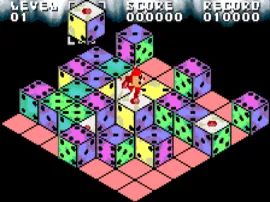
The game loads when you press Play · press “Play Now” inside the game if it asks.
XI (Sai) Little (J)
XI Little
Getting to Know XI Little
- WonderSwan
- Puzzle
- 5· 0 votes
GAME INFO
- Platform
- WonderSwan
- Genre
- Puzzle
- Region
- Japan
How to play XI Little online
Getting Started
When you first boot up XI (Sai) Little (J), you'll see a Japanese title screen. Press Enter to start - this usually brings you to a main menu with options like "ゲームスタート" (game start) and "オプション" (options). Select the first option to begin. The game likely presents a grid of tiles or numbers. Your goal is to clear them by matching or arranging them according to the rules shown on screen, though the tutorial text will be in Japanese. Trial and error works: try moving a tile with the D-Pad and pressing X to swap or select.
The core loop is simple: each round presents a new puzzle. Clear all required tiles to advance, or survive a time limit. The WonderSwan's screen is small but clear. If you get stuck, use the Select button to pause and consider your next move. There is no continue system visible in many early WonderSwan puzzle games, so restarting is common. Keep an eye on the score counter - that's your main feedback. With no English translation, memorizing a few button prompts and the layout of the menu (usually four options arranged vertically) will help you navigate.
CONTROLS
Controls
- Arrow Keys: D-Pad / Movement
- X: A button
- S: B button
- Enter: Start
- V: Sound
XI Little FAQ
Is XI Little considered easy to pick up or challenging?
The rules are intuitive enough to grasp within a few rounds - moving and matching tiles doesn't require deep knowledge. However, later stages ramp up the speed and complexity, offering a fair challenge for puzzle veterans. Most players find it accessible but not trivial.
Is XI Little exclusive to WonderSwan or did it appear on other systems?
This title appears to be a WonderSwan exclusive, never ported to other consoles or handhelds. No record of releases on Game Boy, PlayStation, or any other platform exists in the known databases.
Who developed XI Little?
The developer is not clearly documented in English sources or the retrogames.cc listing. Bandai published many WonderSwan titles, but without a confirmed studio name, it's best to treat the developer as unknown.
You may also like
All WonderSwan games Digimon Adventure 02 - D1 Tamers
 Alchemist Marie & Elie - Futari no Atelier
 Dragonball
 Uchuu Senkan Yamato
 Hunter X Hunter - Greed Island
 Pocket Fighter
 Digimon Digital Monsters - Anode & Cathode Tamer - Veedramon Version
 Puzzle Bobble
 Digimon Tamers - Brave Tamer
 Digimon Tamers - Digimon Medley
 From TV Animation - One Piece - Niji no Shima Densetsu
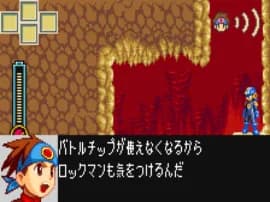 Rockman EXE WS
GAME INFO
- Platform
- WonderSwan
- Genre
- Puzzle
- Region
- Japan
COMMENTS (0)
No comments yet. Be the first to share your thoughts.