Ax Battler - Golden Axe Densetsu (Japan) (v1.5)
About Ax Battler - Golden Axe Densetsu (Japan) (v1.5)
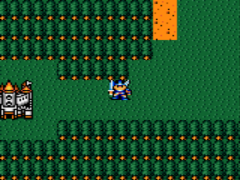
Ax Battler - Golden Axe Densetsu is a Japan-exclusive Game Gear title released in 1991 by Sega. It's a top-down action RPG that takes the Golden Axe universe in a different direction from the arcade beat 'em ups. This version carries a v1.5 revision label, likely a bug-fix or minor update. The game was developed by Sega's internal teams and never saw an official release outside Japan, making it a curious piece for retro collectors.
How to Play Ax Battler - Golden Axe Densetsu (Japan) (v1.5) Online
The game boots straight to a title screen with Japanese text. Press Start (Enter) to begin. The main menu uses simple kanji and hiragana; the first option is usually "New Game" (たび にでる or a sword icon), while the second may be "Continue" (つづける). Use the D-Pad to move the cursor and the A button (X) to confirm. If you select a wrong option, you can back out with the B button (S).
Once in the game, you control Ax Battler exploring a top-down overworld divided into screens. Talk to NPCs by walking up to them and pressing A. You will enter towns, forests, and caves. Combat is real-time: press B (S) to swing your sword. You have a health bar and magic points. Collect gold and items from fallen enemies. The core loop is simple: explore, fight, level up, and progress through story events. Menus for items, status, and magic are accessed with the Start button; navigate with D-Pad and confirm with A, cancel with B.
The Japanese menus are minimal and mostly use icons. The item menu shows a bag icon, the status screen shows a person icon, and the magic screen shows a wand. Experiment with the D-Pad to see which selection highlights. If you get stuck, remember that the B button often cancels or returns to the previous menu. The game saves progress via passwords, so be ready to write down a code when prompted.
Ax Battler - Golden Axe Densetsu (Japan) (v1.5) Keyboard Controls
Controls
- Arrow Keys: D-Pad / Movement
- X: Button 1
- S: Button 2
- Enter: Start / Pause

Comments (0)