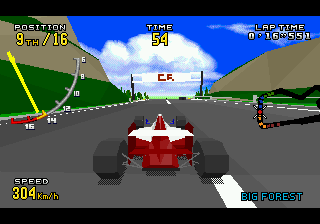
Virtua Racing Deluxe (Japan)
Virtua Racing Deluxe (Japan) on 32X
You pick one of several Formula One-style cars and race against the clock or against computer opponents across six courses spanning varying terrain. The core gameplay revolves around nailing turns without losing too much speed, as the cars handle with a heavy, realistic weight that punishes oversteer. Each track has shortcuts and elevation changes to learn, and you can shift gears manually or let the automatic system handle it. Time Attack mode lets you chase ghost cars, while Grand Prix mode pits you against AI racers across a set of tracks.
For retro racing fans, Virtua Racing Deluxe is a solid pick if you own a 32X - it's one of the more polished titles on the add-on. The polygonal visuals, while primitive by modern standards, still have a charming early-3D feel that captures the arcade spirit. It's not the deepest simulator, but the tight controls and track variety give it lasting appeal for short bursts. If you're curious about the 32X's library, this is a must-try alongside a handful of other standout games.
How to Play Virtua Racing Deluxe (Japan) Online
Getting Started
When you fire up Virtue Racing Deluxe, you'll see a title screen in Japanese. Press Enter to start, then use the Arrow Keys to select a game mode. The main options are Grand Prix (GP), Time Attack (TA), and VS Mode for two players. If you're new, start with Time Attack to learn the tracks without pressure. Use X to confirm your choice and S to go back.
The core loop is simple: pick a car and a track, then race. You accelerate with S (B button) and brake with A (X button). Steer with left/right Arrow Keys. Shift gears manually with Q (L) for up and E (R) for down, or leave it on automatic by not touching those buttons. Each track has a layout with sharp turns and straightaways, so practice braking early. The Japanese menu text might be confusing, but the symbols for GP and TA are consistent across versions - look for the kanji グランプリ (GP) or タイムアタック (TA).
In Grand Prix, you race against three AI opponents across multiple tracks, earning points for your finish position. You must place in the top three to advance. VS mode allows two players to race head-to-head on the same screen using split-screen. The game supports up to two players with a second controller attached. The handling takes getting used to because the cars feel heavy and slide if you brake too hard. Stick with it, and you'll find each track rewards memorizing its corners.
Virtua Racing Deluxe (Japan) Keyboard Controls
Controls
- Arrow Keys: D-Pad / Movement
- X: A button
- S: B button
- Z: C button
- A: X button (6-button pad)
- Q: Y button (6-button pad)
- E: Z button (6-button pad)
- Enter: Start / Mode


Comments (0)