The game loads when you press Play · press “Play Now” inside the game if it asks.
RBI Baseball '95 (USA)
RBI Baseball '95
About RBI Baseball '95
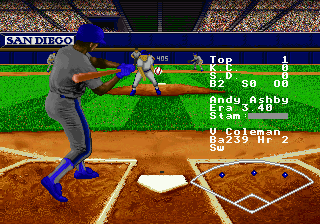
RBI Baseball '95 is a baseball video game released for the SEGA 32X in North America in 1995. Developed and published by Time Warner Interactive, it marked the final entry in the R.B.I. Baseball series to appear on a Sega platform. This sports title followed up on RBI Baseball '94 and was exclusive to the 32X add-on, targeting fans who wanted a Major League Baseball simulation on Sega's short-lived hardware.
The player picks a team from the available MLB clubs and plays through nine-inning games focusing on batting, pitching, and fielding. At the plate, you time a swing to make contact with the pitch; on the mound, you choose pitch types and aim for the strike zone. Base running and defensive plays involve button presses to advance runners, throw to bases, or catch fly balls. The core loop is playing individual games, either against the computer or another player, with the aim of outscoring the opposition.
Today, RBI Baseball '95 holds a niche place in the 32X library. It is a straightforward arcade-style baseball sim, but it doesn't offer the depth or polish of contemporary titles like Sega's own World Series Baseball or the newer Major League Baseball games. For retro collectors, it's an interesting piece of 32X history, especially as the last RBI game on Sega. However, it feels dated and lacks features modern players expect. It's best approached as a curiosity for fans of the series or those exploring the 32X catalog.
GAME INFO
How to play RBI Baseball '95 online
To start playing RBI Baseball '95, first boot the game using the Start key. You will be presented with a title screen; press Start again to proceed to the main menu. From there, you can choose to play a single game or set up a two-player match. Use the D-Pad to highlight your option and press the A button (X key) to confirm.
Once a game begins, you take control of your selected team. When batting, press the A button to swing the bat. Timing and positioning matter - you can move the batter in the batter's box with the D-Pad. When pitching, choose a pitch type using the D-Pad and then press the A button to deliver. You can also aim pitches with the D-Pad before releasing. Fielding is automatic to an extent, but you control throws by pressing the B button (S key) to throw to the base indicated by the highlighted fielder.
The game proceeds inning by inning, with three outs per half-inning. The goal is to score more runs than the opponent. Experiment with different teams to see their strengths. The game does not have a season mode - it's strictly one-off games or exhibition matches.
CONTROLS
Controls
- Arrow Keys: D-Pad / Movement
- X: A button
- S: B button
- Z: C button
- A: X button (6-button pad)
- Q: Y button (6-button pad)
- E: Z button (6-button pad)
- Enter: Start / Mode
RBI Baseball '95 FAQ
Who developed RBI Baseball '95?
Time Warner Interactive developed and published RBI Baseball '95 exclusively for the SEGA 32X.
What makes RBI Baseball '95 stand out among SEGA 32X titles of its era?
It is the final entry in the R.B.I. Baseball series on any Sega platform and one of the few sports games released for the 32X. Its arcade-style gameplay and official MLB license set it apart from most other games in the 32X library, though it is not considered a standout title.
Does RBI Baseball '95 have a multiplayer or co-op mode?
The game supports two-player head-to-head play, allowing two people to compete against each other. This is a standard feature for the series and was common in baseball games of the time.

COMMENTS (0)
No comments yet. Be the first to share your thoughts.