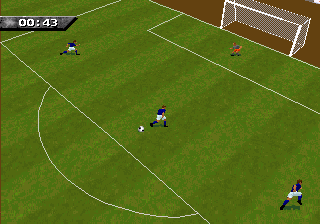
The game loads when you press Play · press “Play Now” inside the game if it asks.
FIFA Soccer '96 (Europe) (En,Fr,De,Es,It,Sv)
FIFA Soccer '96
Inside FIFA Soccer '96
FIFA Soccer '96, released in 1995, is a football simulation from EA Sports and part of the long-running FIFA series. This European multi-language version (English, French, German, Spanish, Italian, Swedish) runs on the Sega 32X, an add-on that extended the Genesis/Mega Drive's capabilities. Developed by Extended Play Productions, the 32X edition uses the same 'Virtual Stadium' engine found in the Saturn and PlayStation versions, bringing real-time 3D graphics to this hardware. It marked the first time the series attempted a fully polygonal look, a big step from the sprite-based earlier entries.
You control a team of eleven players on a fully rendered pitch, moving the ball via passes, shots, and tackles. The game uses a standard football ruleset: two halves, offsides, fouls, and corner kicks. Matches play out from a fixed camera perspective that scrolls with the action. You can select from a roster of international teams and compete in exhibition matches or a tournament. The controls are straightforward - directional movement, a button to pass, another to shoot, and a tackle command - though the transition from 2D to 3D gave the gameplay a slightly different feel compared to earlier FIFA titles.
Today, FIFA Soccer '96 on 32X is a historical curiosity more than a must-play. It was an early attempt at 3D football on a console that didn't have a huge library, and the 32X itself was a commercial flop. The game's visuals are rudimentary compared to even the PlayStation version, but it holds a place as one of the few 32X sports titles. For collectors or fans of football game evolution, it's worth a quick look to see how the series began its shift to polygonal graphics, but the Genesis version or later titles offer smoother gameplay.
How to Play
Section 1 - Controls
Controls
- Arrow Keys = D-Pad
- X = A button (jump/confirm)
- S = B button (run/attack/cancel)
- Z = Y button
- A = X button
- Q = L shoulder
- E = R shoulder
- Enter = Start
- V = Select
GAME INFO
How to play FIFA Soccer '96 online
Section 1 - Controls
Section 2 - Getting Started
When you first boot FIFA Soccer '96 on 32X, you'll see a title screen followed by a menu offering Exhibition, Tournament, and Options. Pick Exhibition to jump straight into a match. Select your team from the list of national sides - the game includes most major footballing nations of the mid-90s. After choosing a side, you can also pick an opponent and set the match length (usually 4 minutes per half by default). Once the match begins, control your team using the D-Pad to move, X to pass or select, S to shoot or tackle, and Z for a lob pass. The game uses a simple, arcade-style physics engine; the ball can sometimes feel floaty. Pay attention to the radar at the bottom of the screen to spot teammates' positions. There is no save feature - every match is a one-off unless you play through a full tournament in one sitting. If you want a quick game, stick with Exhibition.
CONTROLS
Controls
- Arrow Keys: D-Pad / Movement
- X: A button
- S: B button
- Z: C button
- A: X button (6-button pad)
- Q: Y button (6-button pad)
- E: Z button (6-button pad)
- Enter: Start / Mode
FIFA Soccer '96 FAQ
Can players save progress in FIFA Soccer '96?
FIFA Soccer '96 does not include any save or password system. All progress is lost once the console is turned off. To complete a tournament, you must play through all matches in a single session.
Does FIFA Soccer '96 have a multiplayer or co-op mode?
The game supports two-player versus play, allowing a friend to compete against you. There is no cooperative mode - both players always control separate teams. To access this, simply select two-player from the menu and each player uses their own controller.
Is FIFA Soccer '96 an official release, a fan hack, a prototype, or another kind of build?
This is an official commercial release published by EA Sports in 1995. It is not a hack, prototype, or homebrew - it was sold at retail for the Sega 32X.

COMMENTS (0)
No comments yet. Be the first to share your thoughts.