CHOOSE A VERSION
2 versions · same consoleChoose an original release, regional version, revision, bootleg or clearly labelled ROM hack/mod, then press Play. Hacks may change the gameplay. Switching versions restarts the player.
Selected: Default · Japan, USA · Japan, USA
The game loads when you press Play · press “Play Now” inside the game if it asks.
Tennis (Japan, USA)
Tennis
Getting to Know Tennis
- Nintendo Entertainment System
- Sports
- 5· 0 votes
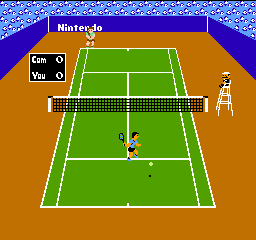
Tennis is an early sports title for the Nintendo Entertainment System, originally released in 1984 for the Famicom in Japan and later as a launch window game for the NES in North America. Developed and published by Nintendo, it sits among the console's iconic black-box series that introduced millions to home console gaming. As a straightforward tennis simulation, it translates the sport into a simple top-down, two-dimensional format that was common for the era.
The game offers singles and doubles matches against a computer opponent with five selectable difficulty levels, or a head-to-head mode for two players. Controlling your on-screen athlete with the D-pad, you use the A button to swing the racket for a normal shot and the B button to send a lob over your opponent's head. Matches follow standard tennis scoring, and the camera remains static, showing the full court from a behind-the-player perspective. While the mechanics are basic, positioning and timing shots still demand a bit of practice, especially as the CPU grows more aggressive at higher difficulties.
What keeps Tennis worth revisiting is its place in NES history rather than deep gameplay innovation. It's a clean, no-frills representation of the sport that arrived right as consoles were learning to handle ball physics in two dimensions. The referee, a mustachioed figure clearly modeled after Mario, adds a touch of personality that later sports games would build upon. If you're exploring the NES library from the beginning, this cartridge shows how Nintendo laid the groundwork for its more complex sports offerings in the years to come.
GAME INFO
- Platform
- Nintendo Entertainment System
- Genre
- Sports
- Publisher
- Activision
- Developer
- Activision
- Released
- 1984
- Players
- 1-2
- Region
- Japan, USA
How to play Tennis online
Start by selecting the game mode (singles or doubles) and the computer difficulty level from 1 to 5 using the D-pad and A button. In two-player mode, both players share the same screen, one controlling the bottom player and the other the top. After confirming your choices, the match will begin with a serve.
During play, stay near the center of the baseline to return balls effectively. The A button performs a standard strike, which is your go-to for rallying, while the B button launches a lob that can catch an opponent who crowds the net. The ball's trajectory is fast and flat, so watch the shadow to judge its landing spot. You'll need to win by two points in each game, just like real tennis.
If you're new to the game, try starting on difficulty level 1 to get a feel for the timing. The CPU opponent becomes noticeably tougher at levels 4 and 5, reacting faster and placing shots more accurately. There isn't a tutorial, so jumping into a quick exhibition match is the best way to learn.
CONTROLS
Controls
- Arrow Keys: D-Pad / Movement
- X: A button (jump / confirm)
- S: B button (run / attack / cancel)
- Enter: Start / Pause
- V: Select
Tennis FAQ
Who developed Tennis?
The game was developed by Nintendo, a company known for its iconic contributions to the gaming industry.
Is there anything iconic or memorable about Tennis?
While it may not be as famous as other Nintendo titles, Tennis is recognized for its straightforward gameplay and nostalgic value for fans of retro sports games.
Which regions was Tennis released in?
Tennis was released in both Japan and the USA, making it accessible to players in those regions during its initial launch.
You may also like
All Nintendo Entertainment System games











GAME INFO
- Platform
- Nintendo Entertainment System
- Genre
- Sports
- Publisher
- Activision
- Developer
- Activision
- Released
- 1984
- Players
- 1-2
- Region
- Japan, USA
COMMENTS (0)
No comments yet. Be the first to share your thoughts.