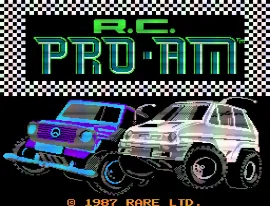
R.C. Pro-Am (Europe)
Getting to Know R.C. Pro-Am (Europe)
R.C. Pro-Am (Europe) is a racing game released for the Nintendo Entertainment System (NES) in Europe. Developed by Rare and published by Tradewest, this title is part of the popular R.C. Pro-Am series that emphasizes a unique blend of racing and combat elements. The game features an isometric perspective, which was a common design choice in many arcade-style racers of its era.
In R.C. Pro-Am, players take control of miniature remote-controlled cars, racing on various tracks while avoiding obstacles and competing against opponents. The gameplay includes collecting power-ups, which can enhance speed or provide weapons to hinder rivals. Players navigate through different courses, each with its own challenges and layouts, aiming to finish in the top positions to unlock new tracks and vehicles.
This title remains a nostalgic favorite for many retro gaming enthusiasts due to its engaging gameplay and fun mechanics. While it may not have the depth or complexity of some contemporary racing games, its straightforward design and competitive nature make it a delightful experience. R.C. Pro-Am is a great pick for anyone looking to explore classic NES titles, especially if they enjoy a mix of racing and action elements.
How to Play R.C. Pro-Am (Europe) Online
To get started with R.C. Pro-Am, first select a race from the main menu. You’ll begin with a basic car and will need to navigate through the tracks while competing against other racers. The core loop involves racing, collecting power-ups, and trying to finish in the best position possible.
As you race, be sure to utilize the power-ups effectively. These can give you an edge over your opponents, whether by increasing speed or providing offensive capabilities. Understanding the layout of each track will help you avoid obstacles and make strategic use of the power-ups to gain the upper hand.
R.C. Pro-Am (Europe) Keyboard Controls
Controls
- Arrow Keys — D-Pad / Movement
- X — A button (jump / confirm)
- S — B button (run / attack / cancel)
- Enter — Start / Pause
- V — Select


Comments (0)